


For years health authorities have warned of the growing threat posed by drug-resistant bacteria, but most of us have been half-listening. Not anymore.
A virulent strain of bacteria that resists many antibiotics appears to be killing more people annually than AIDS, emphysema or homicide, taking an estimated 19,000 lives in 2005, according to a study published last week in the Journal of the American Medical Association. The recent death of a 17-year-old high school football player in Virginia is a tragic reminder that methicillin-resistant Staphylococcus aureus, or MRSA, can prey on otherwise healthy people.
The best defense against the potentially deadly infection is common sense and cleanliness. "We need to reinvent hygiene for the 21st century,'' said Dr. Charles Gerba, professor of environmental microbiology at the University of Arizona at Tucson. "You go to a grocery store, and hundreds of thousands of people have touched those surfaces every day. Microorganisms are evolving very rapidly.''
Here are answers to common questions about community-acquired staph infections, or CA-MRSA.

What does CA-MRSA look like?

CA-MRSA is primarily a skin infection. It often resembles a pimple, boil or spider bite, but it quickly worsens into an abscess or pus-filled blister or sore. Patients who have sores that won't heal or are filled with pus should see a doctor and ask to be tested for staph infection. They should not squeeze the sore or try to drain it — that can spread the infection to other parts of the skin or deeper into the body.
Who is at risk?
The vast majority of MRSA cases happen in hospital settings, but 10 percent to 15 percent occur in the community at large among otherwise healthy people. Infections often occur among people who are prone to cuts and scrapes, such as children and athletes. MRSA typically spreads by skin-to-skin contact, crowded conditions and the sharing of contaminated personal items. Others who should be watchful: people who have regular contact with health care workers, those who have recently taken such antibiotics as fluoroquinolones or cephalosporin, homosexual men, military recruits and prisoners. Clusters of infections have appeared in certain ethnic groups, including Pacific Islanders, Alaskan Natives and Native Americans.
What can I do to lower my risk of contracting MRSA?
Bathing regularly and washing hands before meals is just a start. Wash your hands often or use an antibacterial sanitizer after you've been in public places or have touched handrails and other highly trafficked surfaces. Make sure cuts and scrapes are bandaged until they heal. Wash towels and sheets regularly, preferably in hot water, and leave clothes in the dryer until they are completely dry. "Staph is a pretty hardy organism,'' said Dr. Gerba.
Remind kids and teenagers that personal items shouldn't be shared with their friends, he added. This includes brushes, combs, razors, towels, makeup and cell phones. A teenager in Dr. Gerba's own family once contracted MRSA, he said, and he eventually traced the bacteria to her cell phone. She had shared it with a friend whose mother worked in a nursing home. Dr. Gerba went on to discover MRSA on the friend's cell phone and makeup compact and on a countertop in her home.
Where does MRSA lurk?
Staph bacteria may be found on the skin and in the noses of nearly 30 percent of the population without causing harm. Experts believe it survives on surfaces in 2 percent to 3 percent of homes, cars and public places.
But the bacteria are evolving, and the statistics may already underestimate the prevalence of MRSA. Be especially vigilant in health clubs and gyms — staph grows rapidly in warm, moist environments. The risks of infection and necessary precautions should be explained to student athletes, particularly those in contact sports who often suffer cuts and spend time in locker rooms. When working out at the gym, make sure you wipe down equipment before you use it. Many people clean just the sweaty benches, but Dr. Gerba notes that MRSA also has been found on the grips of workout machines. And if you have a scrape or sore, keep it clean and bandaged until it heals. Minor cuts and scrapes are the way MRSA takes hold.
What is the single best thing I can do to protect myself from MRSA?
Without question, people need to show far more respect for antibiotics. Misuse of antibiotics allows bacteria to evolve and develop resistance to drugs. But parents often pressure pediatricians to prescribe antibiotics even when they don't help the vast majority of childhood infections. When you do take an antibiotic, finish the dose. Antibiotic resistance is bad for everyone, but your body can also become particularly vulnerable to resistant bacteria if you are careless with the drugs.
How do I find out more?
One of the most useful Web sites is a MRSA primer from Mayoclinic.com. The Centers for Disease Control and Prevention offers a useful Q&A about MRSA in schools. A patient website called MRSA Resources lists a few stories of patients affected by MSRA. Recent Stanford University grad Nick Yee chronicles his struggle with MRSA on his Web site, which includes graphic videos of his wound and treatment. (I couldn't get through them.) And if you have the stomach for it, a number of people have — inexplicably — posted videos of their MRSA wounds on YouTube.
A large collection of atheist quotes. Some of my favorites:
| 1. Thou SHALT NOT believe all thou art told. (back to top) Humans are generally very gullible. We believe are sorts of false statements, stories, reasoning, etc. We even continue to believe falsehoods after they have been proven untrue. History is full of amazing hoaxes often supported by religion and the teachings of the Church (see Science, Truth and the Church) or by others seeking power, popularity or fortune. We have been told the Earth was flat and has four corners which, if not careful, we may fall off. We have been told that the Earth is the center of the Universe. We have been told that sky if a fixed, firm structure to which the sun, moon and stars are affixed. We have been told that personalities and future events are predictable using astrology, card reading, crystal balls and palm reading. We have been told of prophecies by Nostradamas. We have been told of speaking with the dead, the dead rising, life after death, reincarnation and bending spoons, to name only a few. We must be more skeptical in what we are told, what we read and what we are exposed to through the various forms of broadcast media. When exposed to something new, do NOT accept what you hear without facts to support it. There are other agendas at work in your deception. You must always be on guard to protect yourself and your knowledge. |
| 2. Thou SHALT seek knowledge and truth constantly. (back to top) There are many adverse factors making it difficult for us to obtain knowledge and the truth. There is often no motivating factor driving others to present you with fair, factual, scientific truths. By weaving a complex web of lies, religions are able to control people and remain in power. Governments may hide facts and events for fear of scaring the public. There are more advertising dollars and higher ratings in broadcasting claims of communicating with the dead than in Kepler's Laws of Planetary Motion. Therefore, we must take an active role in our own education and constantly seek the truth. It isn't always obvious and is often very difficult to obtain. Thou SHALT make time to read non-fiction. Thou SHALT make time to view educational programs. Thou SHALT spend as much time in the library as you do in the mall or watching television. |
| 3. Thou SHALT educate thy fellow man in the Laws of Science. (back to top) People are generally lazy and hold onto currently held false beliefs. This condition is not acceptable to the ethical atheist. It is not good enough to sit comfortably with your knowledge of the Universe and look in pity at those who are still governed by lies, mythology and sensationalism. Scientific education is the only way to prevail. Only by increasing the comprehension of scientific truths can we hope to continue our progress past the Dark Ages. Only if the world contains more educated people can we hope to not have setbacks. Thou SHALT NOT sit silent and be a closet atheist. Thou SHALT enlighten thy neighbor. |
| 4. Thou SHALT NOT forget the atrocities committed in the name of god. (back to top) Many people have limited knowledge, or none at all, of the atrocities committed during the Inquisition, the Crusades, etc. by the Church and in the name of religion. Christians are not unique in their cruelty. For example, Muslim civilizations often imprison, torture or kill those attempting to convert their citizens to Christianity. (See Atrocities in the Name of Religion - coming soon...) Few are even remotely aware of these atrocities or think, "Oh, that was a long time ago and could never happen again". However, it hasn't been that long ago and is still occurring today in countries like Bosnia, Rwanda, Burundi, Somalia, Israel, Tibet and Afghanistan. Thou SHALT fear a repeat of history. |
| 5. Thou SHALT leave valuable contributions for future generations. (back to top) The nature of knowledge gain is that new truths are most often found by building upon known facts. If every generation were required to start fresh in its quest for knowledge, our progress would be severely impacted. Our children will not have to go back and prove that the earth is not flat. They will not have to rediscover the atom. It is important that our generation, and all those that follow, leave scientific knowledge and resources for our offspring to build upon. Write a book. Publish an article. Develop a web site. Leave money to organizations that further science and education. |
| 6. Thou SHALT live in peace with thy fellow man. (back to top) This should not need stating, but murders, torture, wars and brutality are ever present in all civilizations on earth and have been for all of recorded history. Most of the large scale wars, as well as suicide bombers, are driven by religious beliefs and the belief in an afterlife. Even though many religions claim to be against killing, they promote that killing for god is divine and will ensure a special status in the afterlife. If we didn't have these widespread mythological beliefs, there would likely be a massive decrease in the killings. |
| 7. Thou SHALT live this one life thou hast to its fullest. (back to top) We do not believe in an afterlife nor that we will be reincarnated to live again in another form. It is, therefore, imperative that we live this one life we have to its fullest. We should not live in a puritanical way, starving ourselves of pleasures, in hopes that it somehow makes us better or that we will be judged more favorably in our "next life". However, in living our lives to the fullest, we must always be conscious of our actions to ensure that they do not have adverse effects on our fellow man. |
| 8. Thou SHALT follow a Personal Code of Ethics. (back to top) Everyone should have their own personal code of ethics that drives their behavior. What this contains is an individual undertaking, but current laws are a good starting point. Many of the commandments of the Bible can be summarized by this commandment. For example, it should be self-evident that murder, lying and stealing should be avoided and honoring your mother and father are necessary, assuming of course that they are worthy of this respect (e.g. they are not beating/raping you or otherwise abusing you). In general, a personal code of ethics would not cause harm to others, would be anchored in truth and would strive to make society a better place. |
| 9. Thou SHALT maintain a strict separation between Church and State. (back to top) It is extremely dangerous to mix the mind controlling, fear generating, mythological beliefs of religion with the governing aspects and power of the state. History is full of examples. Many who founded the United States knew this and were willing to die to escape the horrors of Europe. We know that freedom can be measured by the separation of church and state. |
| 10. Thou SHALT support those who follow these commandments. (back to top) Get involved! Our progress in the last 250 years has been ard fought. Do not sit idle and let us suffer setbacks. Religious conservatives are highly organized and well funded. They continue to spread lies. They are trying to rid our schools of teaching evolution. They are infiltrating government. They are targeting our children's young, impressionable minds. We must support those who follow these commandments in every way possible. Support scientific and atheist organizations by submitting writings, donating money, etc. (donations are often tax deductible). Purchase books and subscribe to magazines. Attend seminars. All of these provide backing and support to continue valuable efforts. Worthy organizations include (but are not limited to): Americans United for Separation of Church and State, American Atheists, CSICOP - The Committee for the Scientific Investigation of Claims of the Paranormal and the Skeptical Inquirer Magazine, The Skeptic's Annotated Bible, The Center for Inquiry, EvolveFish, Online Library of Literature, your local library, etc. (For more, see Links of the Ethical Atheist.) |
USB Ubuntu 7.10 install from Linux: This tutorial enables you to install, boot and run Ubuntu 7.10 (Gutsy Gibbon) from USB. In addition to installing Ubuntu to a USB device and then booting Ubuntu from USB, this tutorial will enable you to automatically save your changes and settings back to the stick and further restore them on each boot using a second "casper-rw" persistent partition. The tutorial was written for those already familiar with working from Ubuntu or another Linux desktop environment. If you do not have access to or prefer not to use a Windows computer, this Ubuntu Linux on a stick tutorial is for you.
Ubuntu 7.10 takes slightly longer to boot than previous releases. However, once it's up and running, it performs much better than running from the Live CD.
USB Ubuntu 7.10 Essentials:
Ubuntu 7.10 USB installation tutorial:
Hint: You can drastically speed up the install by Copying (Ctrl+c) and Pasting (Ctrl+v) commands into the terminal instead of manually typing them out. With the exception of replacing X with your drive letter.
Ignore any "cannot create symbolic link" errors
You should now have a USB Ubuntu 7.10 Gutsy Gibbon flash drive that should automatically save your changes, restoring them on boot.
Note: If your having trouble getting Ubuntu to boot, your memory stick may have a corrupted MBR. To repair the MBR of your USB device, at the terminal type sudo apt-get install lilo then type lilo -M /dev/sdx (replacing x with the letter of your flash device)

There are so many little tweaks/hacks Windows users can utilize to refine their operating systems. One such tweak that I stumbled upon was a simple Windows Explorer hack that mimics the sidebar on the OSX Finder window. How does that saying go? "Imitation is the simplest form of flattery"? Instead of the standard folder tree or common tasks, you can now have a layout similar to OSX Finder.
Using a simple installer by Kabol and the corresponding registry tweak, you to will have a Windows Explorer window imitating the OSX Finder. The tweak is 100% reversible if you decide you would rather use the default layout.
Download the required files here:
Finder style for Windows
Restore original Explorer
Adding the Finder Bar
Unzip the 'finderstyleforwindows' archive. Contained within the folder you'll find the 'FinderBar' installer and an additional zip archive containing a registry file. Double-click the installer and complete the installation.
Next, unzip the 'setfinder' archive. You'll find a 'set-finder.reg' file. Double clicking the registry file will automatically add the registry entry to your computer.
In the window prompt click 'Yes' to confirm that you wish to add 'set-finder.reg' to the registry.

A second window will confirm that the registry has been modified.

Click on 'My Computer' or 'My Documents'. You'll notice that the left panel layout mimics the OSX Finder.

By right-clicking anywhere in the column you'll notice the a few different options for configuring the Finder Bar. After making any changes make sure to click the 'Save Configuration'.
See the similarities?

Removing the Finder Bar
If you would rather stick with the default Explorer tree or Common Tasks view, uninstalling the Finder Bar is as easy as installation. Navigate to Start > Control Panel > Add/Remove Programs. Locate the

Unzip the 'restoreexplorer' archive found above and double click the registry file. Confirm that you wish to add the file to your registry and click 'Yes'. Presto. Back to normal.
Before doing anything too fancy with your iTunes (or with anything else for that matter), always do a backup.
This could be as simple as dragging your library to an external drive, although personally I'd recommend a smarter tool — I recommend rsync for geeks, and ChronoSync for civilians.
In any case, don't yell at me if you get confused and permanently delete your heirloom recordings. 'Nuff said.
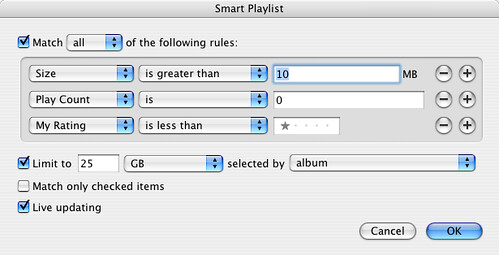
This is the dullest instrument in our drawer, but if you're on deadline for a video editing project and suddenly realize you have 200mb of disk space left — well, you need to delete some shit fast.
This Smart Playlist, as you can see, looks for the biggest bang for the buck in terms of deletion. It's the fastest way to find very large files that you aren't listening to much. You could also use something like What Size for this, but, you know, that would be cheating.
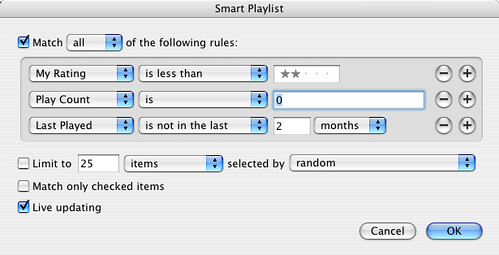
This one's not much more sophisticated, but, if you're doing regular backups, it's my favorite way to quickly and responsibly reduce the disk space used by your library. As with many of these lists, you'll start to see the value of rating your music; in addition to improving the quality of your lists and listening experience, it eventually becomes a quick way to determine which music you can afford to dump in a pinch.
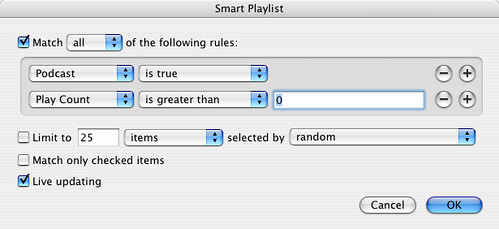
Man, if you aren't careful, podcasts will eat your lunch. Although iTunes provides useful tools for managing the number of eps you keep, per podcast series, you'll be amazed how quickly old episodes will fill up your drive.
This little fella does something insanely simple but critical; it pulls up any podcasts that you've already listened to, making it easy to select them all and delete quickly (without lots of COMMAND- clicking in the "Podcasts" window)
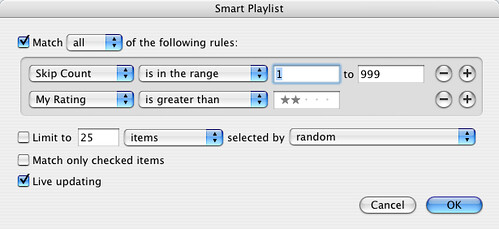
This simple auditor calls you on your ratings. It looks at your higher-rated songs and sees if you're skipping them often — a good sign you don't like them as much as you claim. Very helpful way to refactor if you realize you've gotten too enthusiastic with the 5-star ratings.
This does something like the opposite of the previous list — it pulls up songs that you've listened to a lot but have never rated. Again, if you're going to get the most out of your Smart Playlists, it pays to rate stuff you have a strong opinion about. This is one of the fastest ways to do that.
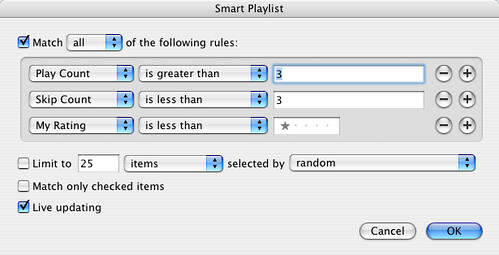
You get the basic idea at this point. By tagging the crap out of your songs, adding correct genres, and rating rating rating, you can produce a library that is both more enjoyable and way more manageable. Even if you save every track you've ever added, you can always benefit from the history of your behavior that iTunes has collected and exposed.
On some networks it's impossible to use BitTorrent. For example, if you're at work, school, or connected to Comcast or a public hotspot. But there's an easy solution to overcome this problem. By using a secure connection (SSH), you can bypass almost every firewall or traffic shaping application.
Here's a relatively simple 3-step guide that will show you how to set it up.
You need an SSH account in order to get this working. You can try one of these free shell providers from this list. I currently use silenceisdefeat which requires a small $1 donation. However, the account is immediately activated and works fine for me.
Download Putty, store it somewhere on your computer and run it. In the session screen enter the host name (I use ssh.silenceisdefeat.org), the port number (22), and tick the connection type box (SSH).

Next, go to SSH –> Tunnels, enter a source port and tick the dynamic box. I'm using port 23456, but you are free to choose any post you like as long as it's available.
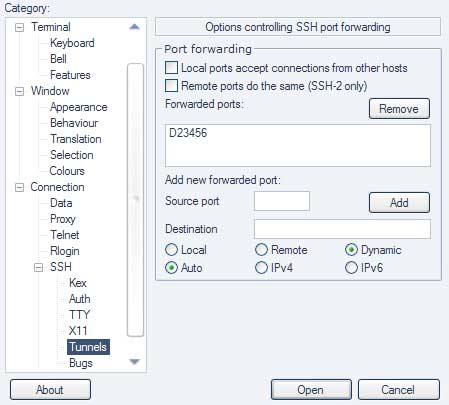
When you're done, it might be a good idea to save the session so you don't have to enter the info next time you run Putty. If you're ready, hit the "open" button in the session screen. A command-line interface will pop-up so enter your username and password that you received from your shell-provider, and you're done.
The last step is to configure your BitTorrent client. I will show you how it's done in uTorrent and Azureus but other BitTorrent clients use a similar setup.
uTorrent: go to Options > Preferences > Connection. Enter your port number (I use 23456), socks 4 or 5 as type, and localhost in the proxy field.
Azureus: go to Tools > Options > Connection > Proxy Options. Tick the "Enable proxying of tracker communications" and "I have a SOCKS proxy" box. Next, enter your port number in the port field (I use 23456) and localhost in the host field.

When you're done, restart your BitTorrent client and you're ready to go. BitTorrent over SSH tends to be a bit slower than your normal connection, but it's a great solution when BitTorrent connections are blocked or throttled.
For those on a Mac OSX, please check out this great tutorial (which in part inspired this article) for more details. It includes instructions on how to do this on a Mac, using Azureus.
By Nate Anderson | Published: October 10, 2007 - 11:42PM CT
The old cliché "You're not paranoid if they really are out to get you" turns out to apply quite nicely to the world of P2P file-sharing. A trio of intrepid researchers from the University of California-Riverside decided to see just how often a P2P user might be tracked by content owners. Their startling conclusion: "naive" users will exchange data with such "fake users" 100 percent of the time.
Anirban Banerjee, Michalis Faloutsos, and Laxmi Bhuyan collected more than 100GB of TCP header information from P2P networks back in early 2006 using a specially-doctored client. The goal of the research was a simple one: to determine "how likely is it that a user will run into such a 'fake user' and thus run the risk of a lawsuit?" The results are outlined in a recent paper (PDF), "P2P: Is Big Brother Watching You?"
For years, P2P communities have suspected that affiliates of the RIAA, the MPAA, and others have been haunting P2P networks to look for those who might be swapping copyrighted files. It's more than a hunch; it's well documented that companies like SafeNet (formerly Media Sentry) engage in this sort of work, and that their testimony is routinely produced at trials. It helped to bring down Jammie Thomas, in fact.
But identifying these organizations is hard. The nature of their business is to remain shadowy, but P2P advocates have spent years compiling "blocklists" of IP ranges that are suspected of belonging to such companies. Connect to a "user" who has an IP address in one of the blocklists and bam: you've just been tracked swapping a file.
By parsing all of the TCP headers that they collected over the course of 90 days, the UC-Riverside researchers came to several conclusions:
The takeaway here is simple: P2P users who don't utilize the blocklists are just about guaranteed to be tracked by "fake users" operating out of those ranges, and thus seem to open the door to possible litigation should the dice be rolled against them.
The study does have one major caveat, however; it does not attempt to determine if the blocklists actually correspond to tracking organizations like SafeNet. The researchers note that "this would be interesting and challenging future work." While using a blocklist makes it easy to avoid connecting to IP addresses found on that list, it's not clear that every range on the lists is really a tracker. Conversely, there's no way to know if addresses not on the list might in fact be tracking users.
1. Right click where ever you want the invisible folder to be and select create a new folder.

2. Right Click on the folder and hit rename. Erase the name of the folder so there is nothing there.
3. If you try to stop here windows will tell you that you need to provide a name. So to get around this… with the name field still active hold down ALT and press 0160 on the number pad (make sure Num Lock is on), release alt

You should now have a blank name with nothing but a folder next to it
4. Now click on the nameless folder and right click. Select Properties.

5. Go to the Customize tab.

6. Find and press the Change Icon button. Scroll through the icons until you find one that has no image.

4. Hit OK and you have an invisible folder!

With the invisible folder you can hide what ever undesirables you have. Be it video games at work, pictures of your family or anything else you can think of "wink".
The folder will show up for a brief second if you put it on your desktop. For that reason it might be smart to place it inside a folder or amongst a group of folders.
Happy Hiding!

