Tuesday, December 07, 2010

Block Bad Website with These Simple Steps

Amplify’d from www.techsupportalert.com

How to Block Bad Websites

Introduction


With the amount of malware currently prowling the internet it's becoming increasingly important to protect your computer. I've broken my advice into both simple and advanced methods. With the simple methods you shouldn't notice many hassles in using your computer but you will get adequate protection. Advanced methods may be more difficult to use but your computer will be more secure.

Simple Steps


1.) Traditional Protection Layers: Antivirus, Firewall, HIPS


A.) Protect your system from infection


Comodo Internet SecurityInstalling an active antivirus program is one of the most important steps in keeping your computer secure. All of the programs reviewed in that article scan for all types of malware, but none can catch all.


In order to compensate for that weakness I would advise that you also use a proactive firewall. Some of the firewalls reviewed have excellent security features, such as Comodo's new automatic sandboxing feature (using isolation) or Online Armor's "run safer" feature (using limited privileges). Personally, I would recommend Comodo Internet Security as it comes with an antivirus, firewall, HIPS, and the automatic sandbox. If you do choose to install Comodo Internet Security, or Comodo Firewall, here's a guide on How to Install Comodo Firewall. All HIPS programs require a little patience in setting up and initially correctly answering the warnings. I would advise that you try one and see if you can deal with the alerts. If they're really too difficult for you then install a simple firewall that lacks a HIPS, but be aware that the protection offered is much less than you would get with the proactive firewall.


If you do decide not to use a proactive firewall, then a good alternative is to get a behavioral blocker, such as ThreatFire. These attempt to detect malware by its behavior, and should have significantly fewer popup alerts. Some malware is best detected by its behavior, so this is a potent second layer of active defense.


B.) Scan for Existing Malware


If you want to ensure your computer is not infected, or perhaps you suspect it is, then I would advise scanning your computer with a few of the programs in this review. Also run a scan with your current antivirus. The programs in the article are specialized scanners, but between them most malware will be detected.


After ensuring your computer is not infected it's now important to keep it that way. One simple approach to help accomplish this is to ensure that any file you download is not malicious before you run it. You can use this guide on How to Tell if a File is Malicious. By following those methods, and using common sense, you should be able to avoid manually running any risky software.


2.) Browser Dependent Protection


A.) General Browser Protection


Almost all popular web browsers now provide some general protection. Firefox, Opera, Google Chrome, and Comodo Dragon have encryption support (with SSL & TLS), deletion of private data, and popup blocking. They also produce warning screens to help you to avoid known malicious sites (anti-phishing, anti-malware protection). Firefox, Google Chrome, and Comodo Dragon also have private browsing modes that clear your tracks when you close the browser. Also Chromium browsers, such as Google Chrome and Comodo Dragon, have built-in secure sandboxing, making them especially difficult for outsiders to exploit even when hackers do find a bug. Comodo Dragon also doesn't have the privacy concerns that come with Google Chrome. In addition it will warn you if the site you are visiting has a SSL certificate that may not be trustworthy.


For blocking tracking cookies I would advise that you enable the option to block third-party cookies in your browser. This will prevent sites from loading cookies in your browser that are not from the site you are currently on. Thus almost all tracking cookies will be blocked. The only time you may have problems, and need to disable this, is sometimes when a site redirects you to another page. That said, in most cases it will work fine.


B.) Security Addons/Extensions


The website ratings freeware such as WOT, LinkExtend, and SiteAdvisor, and link scanners are (reviewed here).


  • WOT(IE, Firefox, Opera, Google Chrome): This has an excellent warning screen that allows you to choose whether to go to a bad site. This is my favorite sort of approach since it leaves the final decision to the user. If you combine this with your own good sense in avoiding untrustworthy sites, then you have a solid and free preventative web shield. If you happen upon a potentially dangerous site, WOT covers the screen with a warning and waits for you to decide. Whether to stay or leave. You can ignore the WOT warning and go to the site anyway or even rate the site if you disagree with the rating.


  • McAfee SiteAdvisor(IE, Firefox): This operates much the same as WOT. It also has filtering features, which block links, and a search engine to help prevent unwanted, or potentially dangerous, sites from appearing in your search results. This filtering or "censoring" of sites runs into the problem of false positives. If the filter draws from a false or controversial security rating for a site, then you won't even see the site in search results to judge for yourself whether it is worth surfing. However using it in this regard is optional.


  • LinkExtend(Firefox): This scans links with eight online services and gives you the verdict. Thus you are given the information, but the decision is still in your hands.


  • KeyScrambler(IE, Firefox): This encrypts your key strokes so that even if you have a keylogger on your computer your passwords, and personal information, will be protected.


  • LastPass(IE, Firefox, Google Chrome, Comodo Dragon): This is an effective password manager, with automatic password and form filling. It not only helps protect your passwords and sensitive data but also allows you to confidently create strong passwords and change them often.


  • Adblock Plus(Firefox): This allows you to subscribe to many different filter lists which help block unwanted or malicious content. This can include malware domains or unwanted privacy threats (tracking, web bugs, and marketing-analysis strings). You can subscribe to any of the lists on that page, but be aware that subscribing to too many will slow down your browsing experience. I'd advise subscribing to either Fanboy's List or both EasyList+EasyPrivacy. In addition it may be a good idea to subscribe to Malware Domains.


  • AdThwart(Google Chrome, Comodo Dragon): This serves the same purpose as Adblock Plus, except it works on Chromium browsers. You can even use the same filter lists.


3.) Browser Independent Protection


One limitation of the browser specific programs or extensions is that they miss other Internet facing applications (Internet messengers, Email programs, media players, etc.). Secure DNS services can filter out known malicious content, but a more general and potent way is with PeerBlock or HostsMan. This is explained here.


There are many good free DNS providers currently available. They are relatively easy to setup and require no software. These services use servers that are more secure than your regular ISP and they even filter out any known malicious content before it even reaches your computer. If you want to understand the technical details about how they work you can read about it here: IP Addresses Explained, DNS Primer.


Below I have listed three of the best services currently available. From them you can choose the one that best fits your needs. None of them will slow down your internet. In fact you may even notice an increase in speed. Each of these has malware blocking capabilities, but at the moment it appears that Norton DNS and ClearCloud DNS are much more potent at preventing malicious downloads. Comodo Secure DNS is currently lagging behind, but this may change as the service matures. I have listed the server names you will use to set up the DNS servers below, but if you're not sure how to set them up you can follow the directions provided by the services.


ClearCloud DNS


  • 74.118.212.1 

  • 74.118.212.2 


Norton DNS


  • 198.153.192.1 

  • 198.153.194.1


Comodo Secure DNS:


  • 156.154.70.22

  • 156.154.71.22


Advanced Methods


The methods discussed here may be more work to setup and manage but if you're willing to put up with the extra hassle they will also provide you with superior security. Be aware that these methods are in addition to those already discussed above. Therefore if you haven't read through the simple methods first then go back. If not then read on.


1.) Limit the Actions Malware Can Take


A.) Use Least-privileged User Accounts (LUA)


I highly suggest using a limited/standard user account (LUA or least-privileged user account) rather than a normal, full administrator account. Alternatively, you can selectively reduce rights for particular applications with DropMyRights (download, editor review), but you have to create or modify shortcuts. (XP users may want to use SuRun to run some applications with more privileges.) In some statistical studies, least-privileged user accounts protect against the majority of malware problems.


Personally I think a blanket LUA creates too many annoying restrictions/prompts for innocuous actions, but others find ways to make it work without pulling out all their hair!


Yet another option for Vista/7 users is to keep the UAC active (meaning "user account control", a built in windows HIPS and least privileged account feature) silently or full on. It automatically reduces rights system wide and virtualizes the registry. Read more about it on Wikipedia. Some like using TweakUAC to help reduce alerts. But a silent UAC makes it mysterious whether an application is going to work correctly (you have to check whether an application needs to be run under administrator mode).


B.) Isolate Malware From Your SystemGesWall


Improve your online protection by isolating or sandboxing applications that frequently use the Internet. These novel options will help prevent the vast majority of malware from getting a foothold. If you are willing to put up with the slight learning curve of Sandboxie (home, editor review) or GeSWall (home, editor review), then I highly recommend one of those products. They use different techniques to prevent or remove malware without depending on antivirus and antimalware scanners (that do not detect everything).


2.) Additional Browser Addons


NoScript: Blocks possibly harmful scripts and other content from executing before you can get away from a site (for example, as you notice a poor site rating). It's a general JavaScript, Java, XSS, JAR, Silverlight, Flash, and other plugin blocker for Firefox. It optionally blocks web bugs to help protect your privacy (unchecked by default in "Options" > "Advanced" > "Untrusted"). However, many sites use such scripts and plugins today for legitimate purposes, so NoScript takes some getting used to and requires you to manually allow sites you trust if you want them to work as expected.


CS Lite: However, NoScript doesn't block cookies. You could just use the built-in cookie blocking features of Firefox or another browser (if applicable), but such features are usually difficult to access. CS Lite allows you to quickly allow/block cookies globally and then easily add exceptions to allow/block individual sites, which gives you more user friendly access to Firefox's cookie managing features. It requires much manual customizing, however, if you block cookies globally since many sites will not work properly (or sometimes not work at all) without them.


 3.) Manually Block Bad Sites


  • Many free programs allow you to block bad sites based on a site's IP address. The very best type of IP Blocker that I've tried is PeerBlock. It's a very simple program that monitors IP connections and blocks connections that are on one of its lists of bad or unwanted sites. It comes with default block lists, allows you to easily download other lists (or create custom ones), automatically updates the lists for you, and uses very low resources (unless you have many, many lists). It's especially excellent for heavy users of P2P connections, or for users who don't use a large Hosts file.


  • The hpHosts, Hostsfile, and MVPS Hosts now focus on preventing malicious content, but they also help reduce ads. All of these Host providers frequently update their files, but make sure you remember to manually download them on a regular schedule (perhaps monthly). Choose only one of the three if you manage them on your own, though.


    But you can use HostsMan to quickly update host files like hpHosts and MVPS Hosts. You can even download both of them, combine them together into a single Host file, and automatically optimize them by deleting duplicate entries. MVPS highly recommends setting the default update method to "overwrite current Hosts file" since it will prevent old entries from remaining in the file.


    Note that there is always a possibility that malware may try to worm its way into the file (another good reason to update them regularly and to use anti-malware software). Some programs lock the Hosts file for this reason, such as WinPatrol, and most proactive firewalls (Comodo, Online Armor, etc.) will also detect access attempts or changes to it.


    Also, users with Vista and above may have to shutdown their DNS client service to avoid slowdowns (all of the host providers above give directions on how to do this). I haven't noticed connection slowdowns with the filter lists I've tried.


If you use too many of these lists, such as a large hosts file and many IP blocklists, then they may slowdown or lessen your browsing experience. Choose them wisely. One idea is to get just one or a few at first, and then decide whether you want more filtering later. It's more important to get to know what they do (and to learn which list blocks which content) than to grab every list you possibly can and perhaps get frustrated with all of them!


4.) Update Software and File Encryption


Picture of Personal Software Inspector (PSI)A.) Repair Security Holes in your Software


Secunia PSI provides you with helpful links to update or uninstall software. But it automatically adds itself to the task scheduler without asking and it's generally slow. So for regular updating, see the article on Software Update Monitors. However, Secunia is also a well respected source for information and you can search its site to read about possible security threats and vulnerabilities to determine the trustworthiness of an application.


B.) Cloak Your Sensitive Information If Needed


Encryption helps with prevention to protect or hide your personal data from prying eyes, thieves, or malware (on the chance that malware luckily gets through and starts scanning for sensitive data).

Read more at www.techsupportalert.com
 

Sunday, December 05, 2010

Use Group Policy to Set Security Zone for Website

Amplify’d from www.grouppolicy.biz
w the Internet Explorer Site zone list will now be populated with the zone you configured above and as you can see in t

As you know Group Policy Preferences are these fantastic new settings that allow IT administrators perform any configuration they want on a users group using Group Policy… well almost..  In this tutorial I will show you how to configured one of the few settings that are not controlled by preferences but can be configured using a native Group Policy.


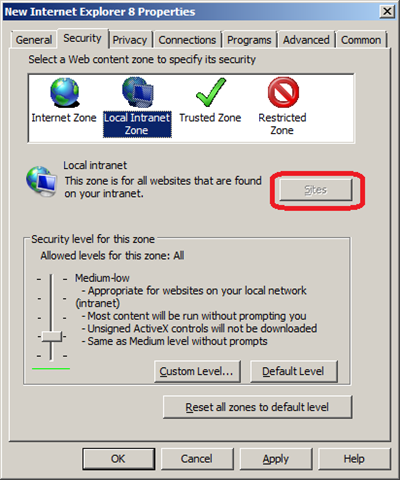
The Internet Explore site zone assignment is one of the few settings you specifically can’t configured using preferences, as you can see (image below) the User Interface to this options has been disabled.


image


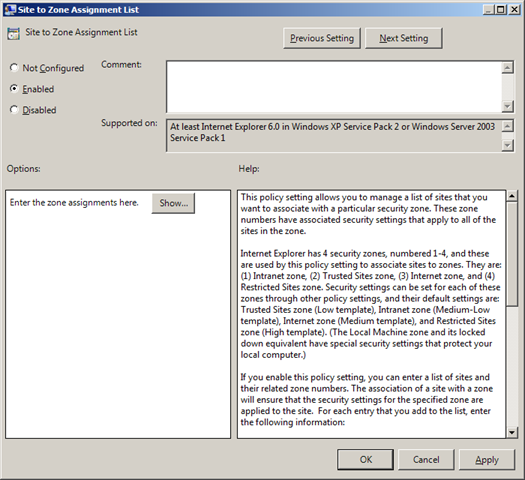
There is a native Group Policy that allows you to control Internet Explorer site zone list is called “Site to Zone Assignment List” which I will go thought below how to use.


Step 1. Edit the Group Policy Object that is targeted to the users you whish this setting to be applied.


Step 2. Navigate to User Configuration > Administrative Templates > Windows Components > Internet Explorer > Internet Control Panel > Security Page and double click on the “Site to Zone Assignment List” and check the “Enable” option then click on the “Show..” button.


image


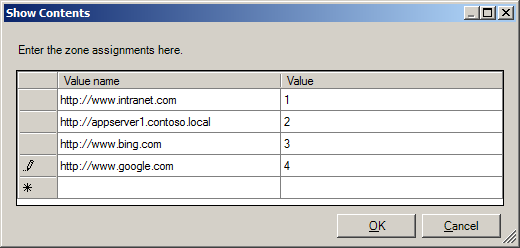
Step 3.  Now type the URL in the “Value name” field with the >* on the far left and then type the zone number (see table below) you want to assign to that zone.


image


Zone Number Mapping


Zone NumberZone Name
1Intranet Zone
2Trusted Sites zone
3Internet zone
4Restricted Sites zone


As soon as you start typing the URL a new line will appear for the next URL.


image 


Step 4. One you have finished assigning adding the URL’s and site zone number click OK


image


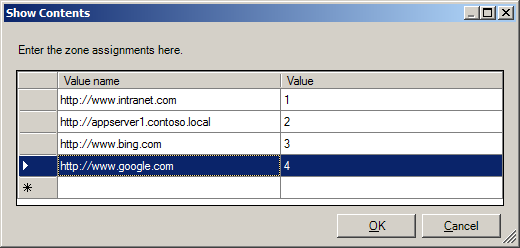
Tip: If you want to delete a row click on the button on the far left to select the row you want to delete (see image below) and then press the “Delete” key.


image


(sites in above list are example only)


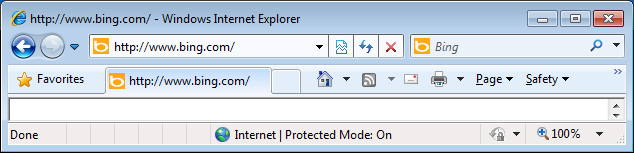
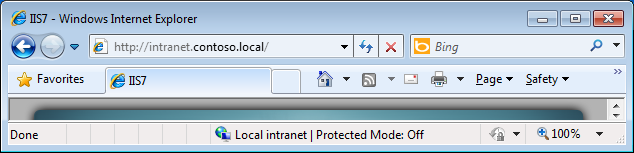
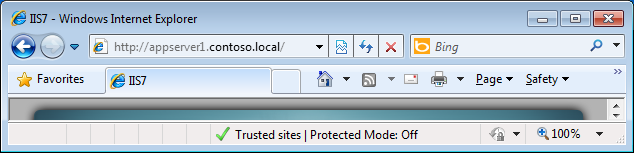
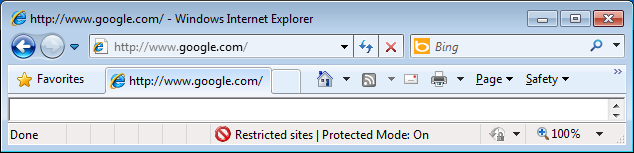
Now the Internet Explorer Site zone list will now be populated with the zone you configured above and as you can see in the images below the Internet Explorer status bar now show the correct zone based on the that the URL’s in the address bar.


image


image


image


image


Read more at www.grouppolicy.biz
 

Top 10 Win7 Registry Tweaks

Amplify’d from lifehacker.com
Top 10 Registry Tweaks that Power Up Windows

10. Hide Pre-Populated Items in Windows Explorer's Sidebar


Top 10 Registry Tweaks that Power Up WindowsWindows Explorer is pretty easy to navigate, but that sidebar can easily get cluttered with features you don't use. For example, if you're the only computer on your network, you probably have no need for the Homegroup or Network trees. Each item in the Explorer sidebar has a registry key, and with just a few minor tweaks, you can have them hidden in no time.


9. Disable Libraries in Windows 7


Top 10 Registry Tweaks that Power Up WindowsThe new Libraries feature in Windows 7 is, in our opinion, one of its best underhyped features—but if you can't get over the annoyance of having multiple folders grouped together, you can get rid of them with a simple registry tweak. Note that, while you can hide them from the Explorer sidebar using #10, the feature itself is still around, and will likely pop up in other applications. So if you really don't like Libraries, this tweak wil get them out of your sight for good.


8. Change Your User Profile Location


Top 10 Registry Tweaks that Power Up WindowsWhether you've bought an SSD and need to move your home folder to another drive or you just don't like how long it takes to navigate to your documents, the registry has a few options for moving your user profile folder. It's not something you want to do if you've been using your computer for awhile (since many places will reference the profile's old location), and it isn't for the faint of heart—since it involves a good 21 steps—but in the end, it may very well make your life a lot easier.


7. Customize Windows Explorer's "Open With" Menu


Top 10 Registry Tweaks that Power Up WindowsThe context menu is great for performing tasks quickly, but as you install more programs, that "Open With" menu can get incredibly unruly. To get rid of those "Open With" entries that never seem to serve any use, you can manually edit which programs show up for which file extensions in the registry. It's a bit more time consuming than other registry tweaks, but it's far from difficult, and you're sure to be happy with the end result. If, on the other side of the coin, you want a program permanently docked in the "Open With" menu, you can add it yourself through the registry too.


6. Speed Up the Windows 7 Taskbar


Top 10 Registry Tweaks that Power Up WindowsThe Taskbar is no doubt one of the best features in Windows 7, but it isn't without its tiny annoyances. The Taskbar popups (along with the associated Aero Peek functionality) require you to hover your mouse over the taskbar for a second before they appear—a delay that gets old quickly. If you'd like to speed up the thumbnail delay, all you need to do is tweak a simple key in the registry. You can also get rid of the Aero Peek delay, for super-fast window management. If the Taskbar thumbnails and Aero Peek aren't your style, you can use this registry hack to cycle through windows quickly with mouse clicks instead.


5. Disable Annoying Notification Balloons


Top 10 Registry Tweaks that Power Up WindowsThe notification balloons in Windows' lower right-hand corner can be helpful, but if you have a number of things going on at once, they can get pretty annoying. It's an extreme measure, but if you'd like to turn them off altogether, all it takes is a very simple registry tweak. Of course, if you find that disabling them completely is too extreme, you can always turn them back on.


4. Change Your PC's Registered Owner


Top 10 Registry Tweaks that Power Up WindowsWhether you've acquired a used PC from someone else, or you just don't like the name you registered anymore, you can change the registered owner and registered organization of your PC with a quick registry tweak. It may seem useless to some, but when you inherit an office computer or end up changing where you work, it's a pain when your computer automatically adds incorrect information to everything.


3. Take Ownership of Any File From the Context Menu


Top 10 Registry Tweaks that Power Up WindowsIf you don't have ownership permissions of a file or folder in Windows, it can be difficult to work with it—and taking ownership of a file is no easy task. Thankfully, with a small registry hack, you can add a "Take Ownership" option to the Windows Explorer context menu, making you the owner of the file in just two clicks. We briefly mentioned this tip before, but you can find the full hack over at our friend The How-To Geek.


2. Stop Windows Update from Hijacking Your PC


Top 10 Registry Tweaks that Power Up WindowsWindows' automatic update system is convenient for those of us that would rather not deal with manual updates day in and day out, but when it forces you to reboot your computer (or forces you to install updates when you put your computer to sleep), it can make you want to pull your hair out. Thanks to the registry, however, there are a few different registry tweaks that will keep Windows Update from getting up in your business: one to keep it from forcibly rebooting your computer, and one to keep it away from your shut down and sleep buttons.


1. Enable God Mode to Quickly Access Any Setting You Want


Top 10 Registry Tweaks that Power Up WindowsIf there's one thing that bugs me about Windows 7, it's that the new Control Panel takes forever to navigate, with seemingly infinite levels of buttons and links to click through just to activate one setting. The Windows 7 "God Mode" hack (which is one of our five favorite Windows 7 tweakers) puts every setting in the Control Panel at your fingertips through a magical folder in Windows Explorer. You don't actually need to enter the Registry Editor to create this beast, but it certainly qualifies as a registry hack, as you're essentially using the registry's Globally Unique Identifiers to create a desktop shortcut to all those settings. While the God Mode folder is the most popular use for this method, its also worth noting that you can use it to create (or re-create) other system places like the Recycle Bin, My Computer, Libraries, and others.

Read more at lifehacker.com
 

5 Lessons for Meeting More Women

Amplify’d from yahoo.match.com

Men: 5 lessons for meeting more women

Lesson #1: Assume the answer is yes

Have you ever been sold a product before? Hair tonic, a car, bathroom tile? I can guarantee you that the salesperson didn’t pitch you by saying, “Um, excuse me… I hate to bother you… would you be interested in… I mean, probably not, but—” No! Any salesman worth his commission is not just selling confidence in his product, but confidence in himself. “Confidence says I’m bright, I’m likeable, women have liked me in the past, I’m comfortable in my own skin,” says Victor, 38, a real estate broker. “Since she has to make a decision on the spot, confidence through nonverbal communication makes the best impression.” You can even “fake it ’til you make it” through these two very simple means: Smile and maintain eye contact. And remember: If you don’t know that you’re worth talking to, how would she know?
Lesson #2: It’s not about you

I’m out at a big Hollywood scene with beautiful people. It’s getting late, towards the end of the night, and I ask my buddy Terrance which woman he’s got his eye on. He points to an attractive brunette talking to a cute blonde across the courtyard. Slightly bemused, I tell him that I will make the introduction. As I stride over, I rationalize that if my approach doesn’t go well, she’s not really rejecting me, but rather, Terrance. I know this isn’t true, but it gets me going.


I arrive while the women are in mid-conversation. I say nothing for a few seconds and when they both look at me, I chime in: “You guys just keep talking. I’ll interrupt when I’ve got something interesting to contribute.” And that was it. It wasn’t a line. It wasn’t planned. It just happened. After three minutes, Terrance came over, I made the introductions, and we both got phone numbers. The moral of the story? Playing my little conversational trick in all pick-up situations can be really helpful. Just ask any married friend how easy it is to talk with women when you know that there are no stakes involved. If it’s not about you, you can’t possibly fail.


Lesson #3: There’s power in numbers

Believe it or not, three is better than one. When you approach a woman who is by herself, she knows that you’re hitting on her based solely on your attraction to her. This increases the pressure in a way that doesn’t always make for a comfortable situation. That’s why the safest way to meet a woman is to approach her in a crowd of her friends. Now there’s no pressure, because nobody knows who you’re hitting on, and you can just be the friendly guy who’s chatting with everybody. “If you’re charming, funny or bright,” says Charles, 36, “she might find herself interested in you before you’ve expressed interest in her.” This tilts things in your favor, even to the point where you might be in control. “By charming her friends and getting their approval, the one you like will be that much more open when you ask her out,” adds Charles.


Lesson #4: It’s just that easy

If you ever doubt how simple it can be to meet a woman, this story should inspire you: I was at a party with some close friends and saw an acquaintance across the room. Late 30s, attractive, friendly, likeable. We’d met probably four times before through a mutual friend who was also at the party. When our eyes met, I smiled at her. She smiled back. Because it was a large and crowded room, I put out my index finger and beckoned her to come over to me. She sort of did a double take, smiled even more broadly and came right over.


“Hi,” I said, warmly.

“Hi,” she said, blankly. Then it hit me.

“You have no idea who I am,” I said.

“None whatsoever,” she replied.

“It’s Evan. Evan Katz.”

“Oh, yes — we’ve met! You cut your hair. I didn’t even recognize you.” She gave me a hug. But I had one more important question to ask her before we continued talking.

“Is it really that easy to get a woman to talk to you… just by calling her over with your finger?”

She took a second to consider the evidence and replied, “Apparently, it is.”


So there you have it. We men have more power than we even realized.


Lesson #5: The outcome doesn’t matter
Maybe you’re not her type. Maybe she’s just out of a relationship. Maybe she’s having troubles at work. Maybe she’s not perceptive enough to recognize your worth. You never know why someone may not be interested in you. Truthfully, it doesn’t matter. It’s more diminishing to your self-esteem to let fear run your life than it is to get rejected. Here’s one story below that showcases this in a big way.


So I was in the checkout line at the grocery store, and I was waiting for a woman with 400 coupons. In the meantime, I was talking to the tall, raven-haired cutie behind me. We were making jokes, laughing, passing the time. All in all, a very pleasant five minutes of my life. The coupon lady finished up. I paid for my stuff, said goodbye to my new friend and rolled my cart out the door.


The second I hit the fresh air, I was kicking myself: Dummy! Why didn’t you ask for her phone number? Because I got all embarrassed what with the other people in line and the woman swiping my bar codes. Because of all the other reasons that nice guys wimp out. I decided that this would not do. I was going to wait until she came out of the supermarket and ask her out. And that’s what I did.


“Hey, it was a lot of fun meeting you in there,” I said to her as she emerged with her bags. “I was wondering if you’d like to grab lunch sometime.”


A big smile came across her face. “You are so cute and I couldn’t be more flattered, but I have a serious, live-in boyfriend. But I really want to thank you for asking. You totally made my day.” After she said goodbye, I went home, walking on air, so happy that I did it, instead of wishing I did it, like so many times before. It didn’t matter if she had a boyfriend or if she was lying or being polite or whatever — all that mattered was that I took a big swing at the plate and even didn’t hurt myself in the process.
Read more at yahoo.match.com
 

Wednesday, December 01, 2010

Cyber Monday 2010 - Sales Estimates

Amplify’d from www.comscore.com
Cyber Monday Surpasses $1 Billion in U.S. Spending as Heaviest Online Shopping Day in History
Cyber Monday Shows 16 Percent Increase vs. Year Ago with Half of Online Spending Coming from Work Computers
comScore (NASDAQ : SCOR), a leader in measuring the digital world, today reported holiday season retail e-commerce spending for the first 29 days of the November – December 2010 holiday season. For the holiday season-to-date, $13.55 billion has been spent online, marking a 13-percent increase versus the corresponding days last year. Cyber Monday reached $1.028 billion in online spending, up 16 percent versus year ago, representing the heaviest online spending day in history and the first to surpass the billion-dollar threshold.


2010 Holiday Season To Date vs. Corresponding Days* in 2009

Non-Travel (Retail) Spending

Excludes Auctions and Large Corporate Purchases

Total U.S. – Home/Work/University Locations
Source: comScore, Inc.


Millions ($)
2009
2010
Percent Change
November 1 – 29
$12,008
$13,553
13%
Thanksgiving Day (Nov. 25)
$318
$407
28%
Black Friday (Nov. 26)
$595
$648
9%
Weekend (Nov. 27-28)
$805
$886
10%
Cyber Monday (Nov. 29)
$887
$1,028
16%


*Corresponding days based on corresponding shopping days
(November 2 thru November 30, 2009)

Cyber Monday Sales Growth Driven by Increase in Spending per Buyer

Cyber Monday’s 16-percent growth in sales versus year ago was driven primarily by an increase in average spending per buyer (up 12 percent) while the number of buyers on Cyber Monday grew by a lower 4 percent to 9 million. The average spending per transaction grew 10 percent to $60.05, while the total number of transactions increased 6 percent to 17.1 million.


Breakdown of Cyber Monday Spending Growth

Cyber Monday 2010 vs. Cyber Monday 2009

Total U.S. – Home/Work/University Locations
Source: comScore, Inc.
 
Cyber Monday 2009
Cyber Monday 2010
Percent Change
Dollar Sales ($ Millions)
$887
$1,028
16%
Buyers (Millions)
8.7
9.0
4%
Dollars per Buyer
$102.19
$114.24
12%
Dollars per transaction
$54.83
$60.05
10%
Transactions (Millions)
16.2
17.1
6%
Transactions per Buyer
1.86
1.90
2%

Buying at Work Drives Cyber Monday Spending

Nearly half of dollars spent online at U.S. Web sites originated from work computers (48.9 percent), representing a decline of 3.8 percentage points from last year. Buying from home comprised the majority of the remaining share (45.4 percent) while buying at U.S. Web sites from international locations accounted for 5.8 percent of sales.


Breakdown of Cyber Monday Spending Growth by Location

Cyber Monday 2010 vs. Cyber Monday 2009

Total U.S. – Home/Work/University Locations
Source: comScore, Inc.

Cyber Monday 2009
Cyber Monday 2010
Point Change
Home (incl. University)
41.6%
45.4%
3.8
Work
52.9%
48.9%
-3.8
International
5.8%
5.8%
0.0
Total
100.0%
100.0%
N/A

“Since its inception, e-commerce activity has been driven heavily by people making online purchases while at work, an effect that is magnified on Cyber Monday as people return to their desks after the Thanksgiving holiday weekend,” added Mr. Fulgoni. “While online shopping from work originally occurred to take advantage of broadband speeds that people lacked at home, it was widely believed that this would decline markedly as home broadband connectivity increased. The fact that spending from work remains so prevalent suggests other explanations. It is more likely that consumers continue to shop from work primarily because by doing so they are able to shop for holiday gifts while minimizing the risk that their children, spouses and significant others might see what Santa will bring .”

Weekly Online Holiday Retail Sales


About comScore
comScore, Inc. (NASDAQ: SCOR) is a global leader in measuring the digital world and preferred source of digital marketing intelligence. For more information, please visit www.comscore.com/companyinfo.

Read more at www.comscore.com
 

Tuesday, November 30, 2010

Comcast Threatens Net Neutrality - Again

Netflix Partner Says Comcast ‘Toll’ Threatens Online Video Delivery

9:45 p.m. | Updated


Level 3 Communications, a central partner in the Netflix online movie service, accused Comcast on Monday of charging a new fee that puts Internet video companies at a competitive disadvantage.


Level 3, which helps to deliver Netflix’s streaming movies, said Comcast had effectively erected a tollbooth that “threatens the open Internet,” and indicated that it would seek government intervention. Comcast quickly denied that the clash had anything to do with network neutrality, instead calling it “a simple commercial dispute.”


The dispute highlighted the growing importance of Internet video delivery — an area that some people say needs to be monitored more closely by regulators. Net neutrality, which posits that Internet traffic should be free of any interference from network operators like Comcast, is thought to be on the December agenda of the Federal Communications Commission.


“With this action, Comcast demonstrates the risk of a ‘closed’ Internet, where a retail broadband Internet access provider decides whether and how their subscribers interact with content,” Thomas C. Stortz, the chief legal officer for Level 3, said in a statement Monday.


Those issues cut to the heart of Comcast’s imminent acquisition of NBC Universal, which is in the final stages of review by the F.C.C. and the Justice Department. The F.C.C. is considering attaching a condition to the merger that would aim to keep Comcast’s Internet network open to competitors, according to public filings this month.


In theory, without government action, Comcast could speed up streams of NBC programs and slow down streams of its rivals’ programs. “This may be one of those teaching moments for consumers to understand what’s at stake,” said Michael McGuire, a media analyst for Gartner.


There is no known case of Comcast ever slowing the traffic to one of its direct competitors, but it did delay some peer-to-peer file traffic in a much-litigated case several years ago. Comcast says it supports an open Internet — but also says that it needs to be able to manage its expensive and still-evolving networks, which are essentially on- and off-ramps to the Internet.


Level 3 in essence operates a highway that connects to those ramps and handles traffic to and from individual Web sites. Comcast customers rely on the company’s on- and off-ramps from that highway. With nearly 17 million broadband Internet customers, Comcast is the nation’s largest such service provider.


The scuffle between the two started on Nov. 19, when Level 3 says Comcast demanded a recurring fee to “transmit Internet online movies and other content to Comcast’s customers who request such content.”


Three days later, under pressure from Comcast, “Level 3 agreed to the terms, under protest, in order to ensure customers did not experience any disruptions,” Mr. Stortz said.


Mr. Stortz did not cite Netflix in his statement. But just a week before Comcast’s demand, Level 3 announced a multiyear deal to support Netflix’s rapidly growing streaming service.


A recent study found that at peak times, Netflix represented 20 percent of Internet download traffic in the United States. That makes it a de facto competitor for incumbent distributors like Comcast and Time Warner Cable, which are eager to protect both the subscription television business and the emerging video-on-demand business.


Mr. Stortz implied that Comcast was taking the action to impair companies that compete with its own cable and Internet services.


A spokesman for Netflix declined to comment Monday. Netflix, which announced a new pricing structure last week, is gradually weaning its customers from DVDs by mail in favor of online streaming, making any new costs a serious concern.


Comcast on Monday rebuffed the notion that the new fees were related to Netflix by saying that the type of traffic distributed by Level 3 was irrelevant. Joe Waz, a senior vice president at Comcast, says it has had a peering agreement with Level 3 to swap traffic fairly evenly. Now Level 3 is sharply increasing its traffic, he said, while resisting a commercial agreement to pay for that.


Comcast is “already carrying huge amounts of video to our high-speed Internet customers every day through commercial arrangements, and it seems to be working for everybody else,” Mr. Waz said. “Level 3 is trying to change the rules of the game.”


If nothing else, the dispute demonstrates that consumers have little, if any, idea how convoluted it can be to transmit video to a computer or mobile phone.


Nonetheless, on Monday night, public interest groups that have steadfastly opposed the combination of Comcast and NBC Universal argued that the Level 3 case proved that Comcast would discriminate against competitors if it could.


“On its face, this is the sort of toll booth between residential subscribers and the content of their choice that a net neutrality rule is supposed to prohibit,” said Harold Feld, legal director of one such group, Public Knowledge, in a statement.


Mr. Stortz said Level 3 would be approaching government regulators this week and “asking them to take quick action to ensure that a fair, open and innovative Internet does not become a closed network controlled by a few institutions with dominant market power that have the means, motive and opportunity to economically discriminate between favored and disfavored content.”


Mr. McGuire, of Gartner, said, “There is no law here. There are only guiding principles. F.C.C. clarity on this kind of thing is going to be required.”

Read more at mediadecoder.blogs.nytimes.com
 

Monday, November 29, 2010

140 Google Interview Questions

140 Google Interview Questions | Seattle Interview Coach

Here's a list of 140 Google interview questions. Many of our clients have interviewed and received Google job offers. Contact us for a

free 15 minute interview analysis

before your Google interview.

Link to Google interview questions for:

  • Why do you want to join Google?
  • What do you know about Google's product and technology?
  • If you are Product Manager for Google's Adwords, how do you plan to market this?
  • What would you say during an AdWords or AdSense product seminar?
  • Who are Google's competitors, and how does Google compete with them?
  • Have you ever used Google's products? Gmail?
  • What's a creative way of marketing Google's brand name and product?
  • If you are the product marketing manager for Google's Gmail product, how do you plan to market it so as to achieve 100 million customers in 6 months?
  • How much money you think Google makes daily from Gmail ads?
  • Name a piece of technology you’ve read about recently. Now tell me your own creative execution for an ad for that product.
  • Say an advertiser makes $0.10 every time someone clicks on their ad. Only 20% of people who visit the site click on their ad. How many people need to visit the site for the advertiser to make $20?
  • Estimate the number of students who are college seniors, attend four-year schools, and graduate with a job in the United States every year.
  • How would you boost the GMail subscription base?
  • What is the most efficient way to sort a million integers?
  • How would you re-position Google's offerings to counteract competitive threats from Microsoft?
  • How many golf balls can fit in a school bus?
  • You are shrunk to the height of a nickel and your mass is proportionally reduced so as to maintain your original density. You are then thrown into an empty glass blender. The blades will start moving in 60 seconds. What do you do?
  • How much should you charge to wash all the windows in Seattle?
  • How would you find out if a machine’s stack grows up or down in memory?
  • Explain a database in three sentences to your eight-year-old nephew.
  • How many times a day does a clock’s hands overlap?
  • You have to get from point A to point B. You don’t know if you can get there. What would you do?
  • Imagine you have a closet full of shirts. It’s very hard to find a shirt. So what can you do to organize your shirts for easy retrieval?
  • Every man in a village of 100 married couples has cheated on his wife. Every wife in the village instantly knows when a man other than her husband has cheated, but does not know when her own husband has. The village has a law that does not allow for adultery. Any wife who can prove that her husband is unfaithful must kill him that very day. The women of the village would never disobey this law. One day, the queen of the village visits and announces that at least one husband has been unfaithful. What happens?
  • In a country in which people only want boys, every family continues to have children until they have a boy. If they have a girl, they have another child. If they have a boy, they stop. What is the proportion of boys to girls in the country?
  • If the probability of observing a car in 30 minutes on a highway is 0.95, what is the probability of observing a car in 10 minutes (assuming constant default probability)?
  • If you look at a clock and the time is 3:15, what is the angle between the hour and the minute hands? (The answer to this is not zero!)
  • Four people need to cross a rickety rope bridge to get back to their camp at night. Unfortunately, they only have one flashlight and it only has enough light left for seventeen minutes. The bridge is too dangerous to cross without a flashlight, and it's only strong enough to support two people at any given time. Each of the campers walks at a different speed. One can cross the bridge in 1 minute, another in 2 minutes, the third in 5 minutes, and the slow poke takes 10 minutes to cross. How do the campers make it across in 17 minutes?
  • You are at a party with a friend and 10 people are present including you and the friend. your friend makes you a wager that for every person you find that has the same birthday as you, you get $1; for every person he finds that does not have the same birthday as you, he gets $2. would you accept the wager?
  • How many piano tuners are there in the entire world?
  • You have eight balls all of the same size. 7 of them weigh the same, and one of them weighs slightly more. How can you find the ball that is heavier by using a balance and only two weighings?
  • You have five pirates, ranked from 5 to 1 in descending order. The top pirate has the right to propose how 100 gold coins should be divided among them. But the others get to vote on his plan, and if fewer than half agree with him, he gets killed. How should he allocate the gold in order to maximize his share but live to enjoy it? (Hint: One pirate ends up with 98 percent of the gold.)
  • You are given 2 eggs. You have access to a 100-story building. Eggs can be very hard or very fragile means it may break if dropped from the first floor or may not even break if dropped from 100th floor. Both eggs are identical. You need to figure out the highest floor of a 100-story building an egg can be dropped without breaking. The question is how many drops you need to make. You are allowed to break 2 eggs in the process.
  • Describe a technical problem you had and how you solved it.
  • How would you design a simple search engine?
  • Design an evacuation plan for San Francisco.
  • There's a latency problem in South Africa. Diagnose it.
  • What are three long term challenges facing Google?
  • Name three non-Google websites that you visit often and like. What do you like about the user interface and design? Choose one of the three sites and comment on what new feature or project you would work on. How would you design it?
  • If there is only one elevator in the building, how would you change the design? How about if there are only two elevators in the building?
  • How many vacuum’s are made per year in USA?
  • Why are manhole covers round?
  • What is the difference between a mutex and a semaphore? Which one would you use to protect access to an increment operation?
  • A man pushed his car to a hotel and lost his fortune. What happened?
  • Explain the significance of "dead beef".
  • Write a C program which measures the the speed of a context switch on a UNIX/Linux system.
  • Given a function which produces a random integer in the range 1 to 5, write a function which produces a random integer in the range 1 to 7.
  • Describe the algorithm for a depth-first graph traversal.
  • Design a class library for writing card games.
  • You need to check that your friend, Bob, has your correct phone number, but you cannot ask him directly. You must write a the question on a card which and give it to Eve who will take the card to Bob and return the answer to you. What must you write on the card, besides the question, to ensure Bob can encode the message so that Eve cannot read your phone number?
  • How are cookies passed in the HTTP protocol?
  • Design the SQL database tables for a car rental database.
  • Write a regular expression which matches a email address.
  • Write a function f(a, b) which takes two character string arguments and returns a string containing only the characters found in both strings in the order of a. Write a version which is order N-squared and one which is order N.
  • You are given a the source to a application which is crashing when run. After running it 10 times in a debugger, you find it never crashes in the same place. The application is single threaded, and uses only the C standard library. What programming errors could be causing this crash? How would you test each one?
  • Explain how congestion control works in the TCP protocol.
  • In Java, what is the difference between final, finally, and finalize?
  • What is multithreaded programming? What is a deadlock?
  • Write a function (with helper functions if needed) called to Excel that takes an excel column value (A,B,C,D…AA,AB,AC,… AAA..) and returns a corresponding integer value (A=1,B=2,… AA=26..).
  • You have a stream of infinite queries (ie: real time Google search queries that people are entering). Describe how you would go about finding a good estimate of 1000 samples from this never ending set of data and then write code for it.
  • Tree search algorithms. Write BFS and DFS code, explain run time and space requirements. Modify the code to handle trees with weighted edges and loops with BFS and DFS, make the code print out path to goal state.
  • You are given a list of numbers. When you reach the end of the list you will come back to the beginning of the list (a circular list). Write the most efficient algorithm to find the minimum # in this list. Find any given # in the list. The numbers in the list are always increasing but you don’t know where the circular list begins, ie: 38, 40, 55, 89, 6, 13, 20, 23, 36.
  • Describe the data structure that is used to manage memory. (stack)
  • What's the difference between local and global variables?
  • If you have 1 million integers, how would you sort them efficiently? (modify a specific sorting algorithm to solve this)
  • In Java, what is the difference between static, final, and const. (if you don't know Java they will ask something similar for C or C++).
  • Talk about your class projects or work projects (pick something easy)… then describe how you could make them more efficient (in terms of algorithms).
  • Suppose you have an NxN matrix of positive and negative integers. Write some code that finds the sub-matrix with the maximum sum of its elements.
  • Write some code to reverse a string.
  • Implement division (without using the divide operator, obviously).
  • Write some code to find all permutations of the letters in a particular string.
  • What method would you use to look up a word in a dictionary?
  • Imagine you have a closet full of shirts. It’s very hard to find a shirt. So what can you do to organize your shirts for easy retrieval?
  • You have eight balls all of the same size. 7 of them weigh the same, and one of them weighs slightly more. How can you fine the ball that is heavier by using a balance and only two weighings?
  • What is the C-language command for opening a connection with a foreign host over the internet?
  • Design and describe a system/application that will most efficiently produce a report of the top 1 million Google search requests. These are the particulars: 1) You are given 12 servers to work with. They are all dual-processor machines with 4Gb of RAM, 4x400GB hard drives and networked together.(Basically, nothing more than high-end PC’s) 2) The log data has already been cleaned for you. It consists of 100 Billion log lines, broken down into 12 320 GB files of 40-byte search terms per line. 3) You can use only custom written applications or available free open-source software.
  • There is an array A[N] of N numbers. You have to compose an array Output[N] such that Output[i] will be equal to multiplication of all the elements of A[N] except A[i]. For example Output[0] will be multiplication of A[1] to A[N-1] and Output[1] will be multiplication of A[0] and from A[2] to A[N-1]. Solve it without division operator and in O(n).
  • There is a linked list of numbers of length N. N is very large and you don’t know N. You have to write a function that will return k random numbers from the list. Numbers should be completely random. Hint: 1. Use random function rand() (returns a number between 0 and 1) and irand() (return either 0 or 1) 2. It should be done in O(n).
  • Find or determine non existence of a number in a sorted list of N numbers where the numbers range over M, M>> N and N large enough to span multiple disks. Algorithm to beat O(log n) bonus points for constant time algorithm.
  • You are given a game of Tic Tac Toe. You have to write a function in which you pass the whole game and name of a player. The function will return whether the player has won the game or not. First you to decide which data structure you will use for the game. You need to tell the algorithm first and then need to write the code. Note: Some position may be blank in the game। So your data structure should consider this condition also.
  • You are given an array [a1 To an] and we have to construct another array [b1 To bn] where bi = a1*a2*...*an/ai. you are allowed to use only constant space and the time complexity is O(n). No divisions are allowed.
  • How do you put a Binary Search Tree in an array in a efficient manner. Hint :: If the node is stored at the ith position and its children are at 2i and 2i+1(I mean level order wise)Its not the most efficient way.
  • How do you find out the fifth maximum element in an Binary Search Tree in efficient manner. Note: You should not use use any extra space. i.e sorting Binary Search Tree and storing the results in an array and listing out the fifth element.
  • Given a Data Structure having first n integers and next n chars. A = i1 i2 i3 ... iN c1 c2 c3 ... cN.Write an in-place algorithm to rearrange the elements of the array ass A = i1 c1 i2 c2 ... in cn
  • Given two sequences of items, find the items whose absolute number increases or decreases the most when comparing one sequence with the other by reading the sequence only once.
  • Given That One of the strings is very very long , and the other one could be of various sizes. Windowing will result in O(N+M) solution but could it be better? May be NlogM or even better?
  • How many lines can be drawn in a 2D plane such that they are equidistant from 3 non-collinear points?
  • Let's say you have to construct Google maps from scratch and guide a person standing on Gateway of India (Mumbai) to India Gate(Delhi). How do you do the same?
  • Given that you have one string of length N and M small strings of length L. How do you efficiently find the occurrence of each small string in the larger one?
  • Given a binary tree, programmatically you need to prove it is a binary search tree.
  • You are given a small sorted list of numbers, and a very very long sorted list of numbers - so long that it had to be put on a disk in different blocks. How would you find those short list numbers in the bigger one?
  • Suppose you have given N companies, and we want to eventually merge them into one big company. How many ways are theres to merge?
  • Given a file of 4 billion 32-bit integers, how to find one that appears at least twice?
  • Write a program for displaying the ten most frequent words in a file such that your program should be efficient in all complexity measures.
  • Design a stack. We want to push, pop, and also, retrieve the minimum element in constant time.
  • Given a set of coin denominators, find the minimum number of coins to give a certain amount of change.
  • Given an array, i) find the longest continuous increasing subsequence. ii) find the longest increasing subsequence.
  • Suppose we have N companies, and we want to eventually merge them into one big company. How many ways are there to merge?
  • Write a function to find the middle node of a single link list.
  • Given two binary trees, write a compare function to check if they are equal or not. Being equal means that they have the same value and same structure.
  • Implement put/get methods of a fixed size cache with LRU replacement algorithm.
  • You are given with three sorted arrays ( in ascending order), you are required to find a triplet ( one element from each array) such that distance is minimum.
  • Distance is defined like this : If a[i], b[j] and c[k] are three elements then distance=max(abs(a[i]-b[j]),abs(a[i]-c[k]),abs(b[j]-c[k]))" Please give a solution in O(n) time complexity
  • How does C++ deal with constructors and deconstructors of a class and its child class?
  • Write a function that flips the bits inside a byte (either in C++ or Java). Write an algorithm that take a list of n words, and an integer m, and retrieves the mth most frequent word in that list.
  • What's 2 to the power of 64?
  • Given that you have one string of length N and M small strings of length L. How do you efficiently find the occurrence of each small string in the larger one?
  • How do you find out the fifth maximum element in an Binary Search Tree in efficient manner.
  • Suppose we have N companies, and we want to eventually merge them into one big company. How many ways are there to merge?
  • There is linked list of millions of node and you do not know the length of it. Write a function which will return a random number from the list.
  • You need to check that your friend, Bob, has your correct phone number, but you cannot ask him directly. You must write a the question on a card which and give it to Eve who will take the card to Bob and return the answer to you. What must you write on the card, besides the question, to ensure Bob can encode the message so that Eve cannot read your phone number?
  • How long it would take to sort 1 trillion numbers? Come up with a good estimate.
  • Order the functions in order of their asymptotic performance: 1) 2^n 2) n^100 3) n! 4) n^n
  • There are some data represented by(x,y,z). Now we want to find the Kth least data. We say (x1, y1, z1) > (x2, y2, z2) when value(x1, y1, z1) > value(x2, y2, z2) where value(x,y,z) = (2^x)*(3^y)*(5^z). Now we can not get it by calculating value(x,y,z) or through other indirect calculations as lg(value(x,y,z)). How to solve it?
  • How many degrees are there in the angle between the hour and minute hands of a clock when the time is a quarter past three?
  • Given an array whose elements are sorted, return the index of a the first occurrence of a specific integer. Do this in sub-linear time. I.e. do not just go through each element searching for that element.
  • Given two linked lists, return the intersection of the two lists: i.e. return a list containing only the elements that occur in both of the input lists.
  • What's the difference between a hashtable and a hashmap?
  • If a person dials a sequence of numbers on the telephone, what possible words/strings can be formed from the letters associated with those numbers?
  • How would you reverse the image on an n by n matrix where each pixel is represented by a bit?
  • Create a fast cached storage mechanism that, given a limitation on the amount of cache memory, will ensure that only the least recently used items are discarded when the cache memory is reached when inserting a new item. It supports 2 functions: String get(T t) and void put(String k, T t).
  • Create a cost model that allows Google to make purchasing decisions on to compare the cost of purchasing more RAM memory for their servers vs. buying more disk space.
  • Design an algorithm to play a game of Frogger and then code the solution. The object of the game is to direct a frog to avoid cars while crossing a busy road. You may represent a road lane via an array. Generalize the solution for an N-lane road.
  • What sort would you use if you had a large data set on disk and a small amount of ram to work with?
  • What sort would you use if you required tight max time bounds and wanted highly regular performance.
  • How would you store 1 million phone numbers?
  • Design a 2D dungeon crawling game. It must allow for various items in the maze - walls, objects, and computer-controlled characters. (The focus was on the class structures, and how to optimize the experience for the user as s/he travels through the dungeon.)
  • What is the size of the C structure below on a 32-bit system? On a 64-bit?

struct foo {

char a;

char* b;

};

  • Efficiently implement 3 stacks in a single array.
  • Given an array of integers which is circularly sorted, how do you find a given integer.
  • Write a program to find depth of binary search tree without using recursion.
  • Find the maximum rectangle (in terms of area) under a histogram in linear time.
  • Most phones now have full keyboards. Before there there three letters mapped to a number button. Describe how you would go about implementing spelling and word suggestions as people type.
  • Describe recursive mergesort and its runtime. Write an iterative version in C++/Java/Python.
  • How would you determine if someone has won a game of tic-tac-toe on a board of any size?
  • Given an array of numbers, replace each number with the product of all the numbers in the array except the number itself *without* using division.
  • Create a cache with fast look up that only stores the N most recently accessed items.
  • How to design a search engine? If each document contains a set of keywords, and is associated with a numeric attribute, how to build indices?
  • Given two files that has list of words (one per line), write a program to show the intersection.
  • What kind of data structure would you use to index annagrams of words? e.g. if there exists the word "top" in the database, the query for "pot" should list that.
  • What is the yearly standard deviation of a stock given the monthly standard deviation?
  • How many resumes does Google receive each year for software engineering?
  • Anywhere in the world, where would you open up a new Google office and how would you figure out compensation for all the employees at this new office?
  • What is the probability of breaking a stick into 3 pieces and forming a triangle?
  • You're the captain of a pirate ship, and your crew gets to vote on how the gold is divided up. If fewer than half of the pirates agree with you, you die. How do you recommend apportioning the gold in such a way that you get a good share of the booty, but still survive?
  • How would you work with an advertiser who was not seeing the benefits of the AdWords relationship due to poor conversions?
  • How would you deal with an angry or frustrated advertisers on the phone?

Sources

http://news.ycombinator.com/item?id=266663

http://tihomir.org/crazy-questions-at-google-job-interview/

http://www.drizzle.com/~jpaint/google.html

http://www.gamedev.net/community/forums/topic.asp?topic_id=299692

http://careers.cse.sc.edu/googleinterview

http://job-interview.blogspot.com/2005/02/google-interview-product-marketing.html

http://www.theregister.co.uk/2007/01/05/google_interview_tales/

http://money.cnn.com/2007/08/29/technology/brain_teasers.biz2/index.htm

http://blogs.lessthandot.com/index.php/ITProfessionals/EthicsIT/google-interview-questions

http://placementsindia.blogspot.com/2007/09/google-top-interview-puzzles.html

http://linkmingle.com/user/interview_questions/google_interview_questions

http://discuss.joelonsoftware.com/default.asp?interview.11.626758.33

http://mindcipher.com/puzzle/78-clock-works

http://www.glassdoor.com

http://bluepixel.ca/blog/?p=69

http://www.businessinsider.com/my-nightmare-interviews-with-google-2009-11

Read more at blog.seattleinterviewcoach.com