.:Lifehacker:.

Sent with Reeder
This MSG was sent from my iPhone. Please excuse any spelling errors or abreviations.
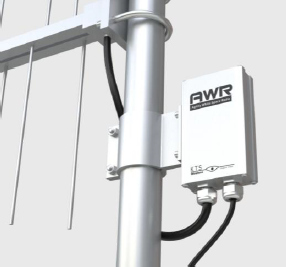
The Federal Communications Commission (FCC) on Thursday approved the first database of all the unused wireless frequencies known as "white spaces" in the United States and has given the green light to the first hardware that will use them.
White space, or the wireless spectrum that was freed from the transition from analog to digital television, would be available to use without requiring a wireless license, similar to the way wi-fi works today. The problem, of course, is that the wireless frequencies that fall in this white space varies from market to market. This is why the database was required.
The database was collected by Spectrum Bridge Inc, who the FCC and Office of Engineering and Technology (OET) appointed in the beginning of 2011.
"With today's approval of the first TV white spaces database and device, we are taking an important step towards enabling a new wave of wireless innovation," FCC Chairman Julius Genachowski said in a statement on Thursday. "Unleashing white spaces spectrum has the potential to exceed even the many billions of dollars in economic benefit from Wi-Fi, the last significant release of unlicensed spectrum, and drive private investment and job creation."
To utilize the white space in a particular area, devices must query this database to find out which channels are unoccupied by authorized radio services, and the first official White Space test deployment will be Wilmington North Carolina, the city which three years ago became the first digital television "transition" market.
The hardware used in this market will be supplied by KTS Wireless, whose KTS TV bands device is the first approved for white space broadband data applications.

Since you never know for sure whether or not there's a skimmer device on credit card readers you use, any swipe potentially puts you at risk of identity theft. The best you can do is to avoid explicitly dangerous situations.
Savings.com suggest the following advice to keep your credit card info out of the hands of identity thieves:
* Look out for the abnormal. If you're at a familiar place and the card reader on the counter behaves differently in any way, cancel the transaction and ask the clerk to swipe it with the reader behind the counter.
* Be suspicious of self-checkout lanes. Since these machines aren't as closely monitored by workers, there's a better chance a thief has manipulated it. Your odds of exposure are still minimal, but those looking to be extra careful should consider shying away from self-checkout lanes.
* Select the "credit" rather than "debit" option. If you're going to be defrauded, it's better that the thief charge the money to you rather than take it directly out of your account. Credit transactions usually give you more leeway to fix fraudulent transactions.
Also, don't forget to stay on top of your charges online to make sure nothing fishy sneaks past you.
4 Ways to Protect Yourself against Credit Card Skimming [Savings.com]
How to enable the root user
OS X Lion
- From the Apple menu choose System Preferences....
- From the View menu choose Users & Groups.
- Click the lock and authenticate as an administrator account.
- Click Login Options....
- Click the "Edit..." or "Join..." button at the bottom right.
- Click the "Open Directory Utility..." button.
- Click the lock in the Directory Utility window.
- Enter an administrator account name and password, then click OK.
- Choose Enable Root User from the Edit menu.
- Enter the root password you wish to use in both the Password and Verify fields, then click OK.
Mac OS X v10.6.x
- From the Apple menu choose System Preferences....
- From the View menu choose Accounts.
- Click on the lock and authenticate with an administrator account.
- Click Login Options....
- Click the "Edit..." or "Join..." button at the bottom right.
- Click the "Open Directory Utility..." button.
- Click the lock in the Directory Utility window.
- Enter an administrator account name and password, then click OK.
- Choose Enable Root User from the Edit menu.
- Enter the root password you wish to use in both the Password and Verify fields, then click OK.
Note: If you are troubleshooting an issue that prevents you from logging in as an administrator, follow the steps in this article to enable the root user.
Mac OS X v10.5.x
- From the Finder's Go menu, choose Utilities.
- Open Directory Utility.
- Click the lock in the Directory Utility window.
- Enter an administrator account name and password, then click OK.
- Choose Enable Root User from the Edit menu.
- Enter the root password you wish to use in both the Password and Verify fields, then click OK.


