Friday, February 17, 2012

Bruce Schneier's Liars and Outliers: how do you trust in a networked world?


Bruce Schneier's Liars and Outliers : how do you trust in a networked world?

John Scalzi's Big Idea introduces Bruce Schneier's excellent new book Liars and Outliers , and interviews Schneier on the work that went into it. I read an early draft of the book and supplied a quote: "Brilliantly dissects, classifies, and orders the social dimension of security-a spectacularly palatable tonic against today's incoherent and dangerous flailing in the face of threats from terrorism to financial fraud." Now that the book is out, I heartily recommend it to you.
 
It's all about trust, really. Not the intimate trust we have in our close friends and relatives, but the more impersonal trust we have in the various people and systems we interact with in society. I trust airline pilots, hotel clerks, ATMs, restaurant kitchens, and the company that built the computer I'm writing this short essay on. I trust that they have acted and will act in the ways I expect them to. This type of trust is more a matter of consistency or predictability than of intimacy.
Of course, all of these systems contain parasites. Most people are naturally trustworthy, but some are not. There are hotel clerks who will steal your credit card information. There are ATMs that have been hacked by criminals. Some restaurant kitchens serve tainted food. There was even an airline pilot who deliberately crashed his Boeing 767 into the Atlantic Ocean in 1999.
My central metaphor is the Prisoner's Dilemma, which nicely exposes the tension between group interest and self-interest. And the dilemma even gives us a terminology to use: cooperators act in the group interest, and defectors act in their own selfish interest, to the detriment of the group. Too many defectors, and everyone suffers — often catastrophically.
Liars and Outliers: Enabling the Trust that Society Needs to Thrive

Bank Switch Kit & Checklist - Make the Move to a Credit Union


With Wells Fargo changing their policies to be less consumer-oriented this week, I've received several questions about the logistics switching banks. In previous decades, closing your account at one bank and opening an account at another was a simple process. All that was required was to walk into one branch, ask to close your account, provide some proof of your identity, take your cash or cashier's check to a different location, and open a new account with your deposit.
With automated banking, direct deposits, and pre-authorized electronic withdrawals and online bill payments, taking your business from one bank to another can be a hassle. There is a financial risk involved; if you neglect to change your banking information with a vendor, your payment could bounce, and you could be subject to late fees, insufficient fund fees, and perhaps even cancellation of your services.
If you've taken a modern approach to banking, with automated and electronic payments, you'll need to start planning in advance. Here are the priorities, if you've already chosen your new bank. To compare banks, read through the reviews available here on Consumerism Commentary, but also consider your local community banks and credit unions.
Download the Consumerism Commentary Bank Switch Kit to help you organize the information you'll need. The link is at the bottom of this article.

Step 1. Open the new account with appropriate minimums.

Before you can change the account information stored with companies that bill you, you'll need to have your new bank's routing (ABA) number and your new account number. For a short period of time, both your old bank account and your new bank account will be active. This ensures that all your payments go through and all your deposits are received during the transition period. Determine which types of accounts you need at your new bank, and have the minimum required to open the accounts ready to deposit.
If you had debit cards, ATM cards, check cards, deposit slips, or paper checks with your old account, don't forget to order the same when you open your new account.
Download the Bank Switch Kit for a convenient way to keep track of your new banking information.

Step 2. Change your direct deposit information.

It could take as many as two pay periods for your new direct deposit instructions to take effect. It could take two to four weeks after requesting the change to your direct deposit before you receive a pay check at your new bank. Most employers have their own forms for submitting changes to direct deposit, but I've included a generic form in the Bank Switch Kit that most human resources should be able to accept. Many employers have the ability to accept direct deposit instructions online, so check with your employer as soon as possible.
This is the slowest aspect of moving from one bank to another, so start as soon as you've opened your new accounts.

Step 3. Adjust your automated bill payments.

If you're living in the twenty-first century, you've likely configured many of your monthly financial obligations to withdraw money from your bank accounts. You'll need to change this banking information one vendor at a time without missing any possible automated withdrawals. Review your past three or four banking statements to help your recollection of all the bills that are paid automatically. Here's a list of some of the most common bills that allow automated payments from your bank accounts.
  • Your rent or mortgage.
  • Your power bills (electricity or gas).
  • Your telephone bills (land line and mobile phone).
  • Your water and sewer bills.
  • Your property taxes.
  • Your income taxes, if you have enrolled in the Electronic Federal Tax Payment System (EFTPS) or your state's electronic payment system.
  • Your car, home, and life insurance.
  • Your other insurance payments.
  • Your credit card bills.
  • Your payments to student loans.
  • Your payments to car loans.
The downloadable bank switch kit has a checklist where you can indicate the date you called to have your banking information changed. When you call, email, or complete this change online, make sure you know when the changes will take effect. Most of the time, the change is immediate, but if you have a payment already pending using your old bank account's information, it might not be until the following month that the vendor applies the new banking information.
If you've opened your new bank account with just the minimum required to avoid fees, keep in mind that you may need to transfer more money from your to cover your bills.

Step 4. Update any linked bank accounts or investments.

The ability to begin investing using automated bank transfers has helped many people begin to save for retirement — or the future in general — without having a large sum to devote to the investment immediately. It's easy to forget about these investments and transfers. I have had a weekly $15 transfer from my primary checking account to another bank's savings account for years, and it would be easy to forget this without reviewing my transactions each month. Updating information regarding your linked accounts serves two purposes:
  • to ensure your accounts don't try to send money to or withdraw money from the account you intend to close, and
  • to ensure you don't miss any saving or investment opportunities as you rearrange your bank accounts.
First, as mentioned above, link the new bank account to your old bank account to ensure you can transfer money to your new account at will. This will ensure you have enough funds in the account to cover all the bills you've transitioned in the previous step. Keep in mind that savings accounts are limited to six on-demand withdrawals per month. If you exceed that number, the bank may charge you fees or close your account before you're ready.
Pay attention to your automated investments to your IRA , transfers to your high-yield savings accounts , and investments to your kids' education funds. Download the Bank Switch Kit for a complete list of possible linked accounts.

Step 5. Wait and close your old bank account.

After you've taken the time to ensure that your old bank account has been inactive and will not expect any new deposits or withdrawals, follow your bank's process for closing your account. In most cases, you can walk into any branch with proper identification for closing your account, but in some cases, banks require you call a telephone number. If that is the case, they might want you to talk to a "retention specialist" who will do his or her best to keep you from closing your account, perhaps by offering you a better deal than you may be receiving. It's best to ignore these offers and stick to your resolution.
If you are required to close your account by phone or by mail, the only way you may be able to receive your deposited money is through a check sent to the address your bank has on file for your account. This is an imperfect process; it would be much better to walk into a branch and walk out with your money. It would frighten me if I had to close a bank account with a significant sum of money and wait for a check for the amount to arrive in the mail.
Once you've received the check, make sure the bank has provided the full balance. Your balance at the end of the statement or online should be zero. Ensure you've received any accrued interest your account would have earned. In some cases, you may need to time the closing of your bank account to ensure you don't miss on any substantial interest that might be due to you if your bank does not accrue interest on a daily basis.
The Consumerism Commentary Bank Switch Kit available for download includes a generic letter you may send to your bank in order to close your account.

Step 6. Destroy old forms.

Shred any debit cards and deposit slips associated with your old account once you receive confirmation that your old bank has closed your account. Get rid of your paper checks and any endorsement stamps that you may have that include your bank number.
With this step, you can celebrate the moment you are now free from a relationship you are better off without. Don't forget to monitor your new account and your bills closely over the next few months to ensure you haven't missed anything. If you find a problem quickly, you may be able to resolve it without needing to pay any penalties (or have penalties reversed if they are charged automatically).

Download the Bank Switch Kit and Checklist Here

Download the Consumerism Commentary Bank Switch Kit(version 1.0α, February 14, 2012). Adobe Reader or another program that displays and prints Portable Document Format (PDF) files is required.
This is a work in progress. Please feel free to share your feedback. I'll continue to revise the Kit to improve it for more consumers who wish to leave one bank behind in favor of another financial institution, whether a national, regional, or community bank or a credit union.

Thursday, February 16, 2012

Visual Guide to the Cost of Love - Infographic


A loving partner is a gift in and of itself, but what about when that gift comes with debt and secretive spending? A marriage not only unites two people for an eternity, but it also brings together past debts and and financial stress. This visual infographic explores how debt and money secrets affect relationships, as well as how to avoid future financial heartache.

Cydia Apps Leak Less Private Data than iTunes Apps


A screenshot of the ContactPrivacy feature in the unofficial Cydia iOS app platform.
Users have learned over the last few years that Apple's "walled garden" approach to third party apps isn't quite as protective of their sensitive data as it might sound. More surprising, perhaps, is another revelation: that the popular unauthorized apps outside those walls tend to respect privacy better than the approved ones inside.
After building a tool called PiOS that analyzes private data leaks from iOS apps, the researchers ran their analysis on 1,407 free apps–825 downloaded from Apple's App Store using the website App Tracker, and 526 accessible through BigBoss, the largest repository of unauthorized apps available to users through the Cydia app market for jailbroken iPhones and iPads.
A table from the UCSB study showing how frequently authorized App Store and unauthorized Cydia iOS apps leak private information.
Of those tested apps, 21 percent of official App Store apps uploaded the user's Unique Device Identifier, (UDID) a series of user-specific digits that can be tracked between apps to assemble a profile of a specific person's behavior. Four percent uploaded the device's location, and half a percent uploaded the user's contact list. When the researchers analyzed the unauthorized Cydia apps, on the other hand, only four percent leaked the user's UDID, and only one app out of the 500 tested–a program specifically designed for espionage called MobileSpy–leaked location or contact data.
But why would Cydia's unauthorized apps actually leak private data less often than those that Apple approves? Egele points to Cydia's culture of privacy among administrators and users. "The people who run Cydia seem very conscious of what information is available and can be accessed," says Egele. "The applications you get from Cydia are geared toward more privacy-aware people."
I've contacted Apple for comment and will update this post if I hear back from the company.
"If you care about this kind of thing, you should jailbreak your phone," says Freeman. "Instead of Apple making decisions about what's good and bad, you decide. People think jailbreaking is about deciding that things Apple doesn't like are good. But it  also allows you to decide that things Apple likes are bad. We provide you the tools to block the functionality you don't believe apps should have on your phone."

References

  1. ^ news that the iPhone app Path uploads users' entire contact lists(thenextweb.com) ( http://thenextweb.com/apps/2012/02/07/path-2-uploads-your-address-book-but-says-that-its-for-friend-matching-and-will-be-opt-in-soon/ )
  2. ^ here (seclab.cs.ucsb.edu) ( http://seclab.cs.ucsb.edu/media/uploads/papers/egele-ndss11.pdf )
  3. ^ discovery by a Singaporean researcher that the social networking app Path uploads users' contact list (mclov.in) ( http://mclov.in/2012/02/08/path-uploads-your-entire-address-book-to-their-servers.html )
  4. ^ using security flaws hackers find in iOS's code (www.forbes.com) ( http://www.forbes.com/sites/andygreenberg/2011/08/01/meet-comex-the-iphone-uber-hacker-who-keeps-outsmarting-apple/ )
  5. ^ ContactPrivacy (www.cultofmac.com) ( http://www.cultofmac.com/145112/how-to-keep-apps-like-path-from-accessing-your-contacts-data-jailbreak/ )
  6. ^ PrivaCy (cydia.saurik.com) ( http://cydia.saurik.com/package/com.saurik.privacy )
  7. ^ here (seclab.cs.ucsb.edu) ( http://seclab.cs.ucsb.edu/media/uploads/papers/egele-ndss11.pdf )
  8. As the scandal swirled this past week over news that the iPhone app Path uploads users' entire contact lists 1 without permission, I came upon a study (PDF here 2 ) released last year by a group of researchers at the University of California at Santa Barbara and the International Security Systems Lab that aimed to analyze how and where iPhone apps transmit users' private data. Not only did the researchers find that one in five of the free apps in Apple's app store upload private data back to the apps' creators that could potentially identify users and allow profiles to be built of their activities. They also discovered that programs in Cydia, the most popular platform for unauthorized apps that run only on "jailbroken" iPhones, tend to leak private data far less frequently than Apple's approved apps.
  9. For Manuel Egele, a post-doctoral researcher at UCSB, the discovery by a Singaporean researcher that the social networking app Path uploads users' contact list 3 only confirms a pattern he and his co-authors have long seen. Four of the Apple-approved apps he tested last year were found to similarly upload contacts, including one from the location-based social network Gowalla.  "Clearly this behavior hasn't changed over the last year. I'm not sure whether there's been any improvement from Apple's side," Egele says. "For easily accessible data, app store apps are much more frequently accessing and leaking that data. The app store is supposed to be a walled garden. Unless Apple gives approval, you can't put things there. But whatever job the company is doing isn't good enough."
  10. With somewhere between 10 million and 15 million users, Cydia's app platform has become the default unofficial app store of users who jailbreak their iPhones and iPads, hacking them to install applications and operating system tweaks that Apple restrictions are designed to block. That kind of device hacking, using security flaws hackers find in iOS's code 4 to unlock its restrictions against running unapproved code, also introduces new security and privacy risks for users by stripping away the phone or tablet's security features and leaving the device open to malware.
  11. But Jay Freeman, Cydia's creator, points to numerous applications available via Cydia that actually give users privacy and security features they wouldn't otherwise have. Immediately after the Path scandal broke, for instance, a developer named Ryan Petrich created a tweak for Cydia called ContactPrivacy 5that warns the user whenever an application wants to upload his or her contact information, (shown above) rather than simply allowing the data to be transmitted by default. Another app that Freeman wrote himself, called PrivaCy 6 , gives the users a toggle switch that allows them to control whether any particular app can upload usage statistics to a remote server.
  12. Read the study from the International Security Systems Lab and the University of California at Santa Barbara here 7 .

Proposed Law will Force Advertisers to Add a Disclaimer on the Ad


by Alia Beard Rau - Feb. 14, 2012 10:57 PM
The Republic | azcentral.com

Women have wrinkles, pores and curves. And there's a movement across the world to make sure advertisers can no longer pretend otherwise.
Now, that movement has come to Arizona.
House Bill 2793, proposed by Rep. Katie Hobbs, D-Phoenix, would require advertisers who alter or enhance a photo to put a disclaimer on that ad alerting customers that "Postproduction techniques were made to alter the appearance in this advertisement. When using this product, similar results may not be achieved."
The bill has little to no chance of success. But Hobbs said that's OK.
"We just wanted to bring it to the table and start a discussion," she said. "We need to bring attention to these body-image issues, especially with young girls. Girls need to know that they don't have to look perfect."
Arizona appears to be the first state in the nation to consider such a bill. There are ongoing efforts to get Congress to take up the matter. Several other countries also regulate or are considering regulating such advertising.


Hobbs said YWCA Maricopa County brought the idea to her.
Sam Richard, who serves on the YWCA Maricopa County board of directors, said the bill is modeled after laws in the United Kingdom.
"As an organization, we are all about empowering women and eliminating discrimination," Richard said. "We want to make sure that young women get a better start and better self-image."
He said girls need to understand that these photos aren't all real. Someone has airbrushed out the model's wrinkles and pores, or put a woman's head on top of a computer-generated perfect body.
"You need to disclose that so our young women don't grow up thinking a poreless face is possible," he said. "That's not the way that I think anyone wants to raise their daughters."
But Louie Moses, creative director of the Phoenix-based Moses Anshell advertising agency, said the advertising industry should be allowed to police itself.
"I don't like legislation that tells us what to do and what not to do in marketing," Moses said. "I know what's right."
He agreed that the evolution of photo-manipulation programs has made it nearly impossible for an average consumer to tell if a photo is real or fake. But he said legitimate advertising companies don't abuse that.
"It's one thing to make the sky bluer. It's another thing to make my body look perfect," he said. "And with the companies we represent, we see an advantage to choosing to tell the truth."
Moses also said people often blame advertising agencies for too many of the evils of society.
"People are always screaming about the images out there, but I think they are overlooking the easiest way to dispel those things," he said, suggesting parents strive to be their children's role models. "We don't want our media raising our kids."
The House Commerce Committee will hold a hearing on the bill this morning, but may not actually vote on it. The bill has to have a vote to move forward.
Seth Matlins, co-founder of Los Angeles-based online women's magazine Off Our Chests, supports Hobbs' effort, calling it "extraordinary."
Off Our Chests is behind the push for similar federal legislation it calls the Media and Public Health Act. The National Eating Disorders Association and other groups have joined the push for a federal law, but no member of Congress has yet agreed to carry it.
"I'm thrilled (Hobbs) is doing this. I haven't heard of any other states trying it," Matlins said.
He said manipulated photo ads create unobtainable beauty ideals.
"People are left feeling worse about themselves because they don't look like something that actually nobody looks like," he said. "We're trying to help the makers of culture understand the relationship between what they do and how people feel."


Preview: OS X 10.8 Mountain Lion


OS X 10.8 - Code Name Mountain Lion to Integrate Additional iOS Features and Functions.
by Nilay Patel  •  Feb. 16, 2012  


Mountain Lion also represents a dramatic speedup in the pace of OS X updates: Apple says it'll be issuing yearly updates from now on. That's partially to match the breakneck pace of iOS development, but also to capitalize on the growing popularity of the Mac in general — Mac sales have outgrown the general PC market for something like six years now, and Apple says it's investing heavily in the platform to build on that trend.

It's not all iOS features, though. Apple's introducing Gatekeeper, which can only be described as a bold new middle ground for app distribution: an optional setting in OS X 10.8 allows users to restrict their systems to run only apps that have been signed by trusted developers using a free certificate provided by Apple. It's somewhere between the locked-down and curated Mac App Store and the totally unrestricted world of the web, and the goal is to prevent malware from running while still allowing users to download apps from the open web — and turning off all the locks is still just a click away.

In addition, Mountain Lion includes Game Center and GameKit, which allows for cross-platform multiplayer gaming and achievements. There's also enhanced iCloud support across the entire system, further refinements to Mail, new Twitter integration with a iOS-like Share button available across apps, and a host of additions and features specific to China, Apple's fastest-growing market. It's a ton of stuff; Mountain Lion is very much a major new version of OS X, not just a polish-and-stabilize job like Snow Leopard.
Mountain Lion will be out later this summer as a paid update in the Mac App Store, but developers can download preview builds starting today. We've been playing with an early copy for a few days now, and while a few pieces aren't quite finished, it's still pretty impressive — Apple's done a remarkable job of blending core elements of iOS into OS X while still preserving the spirit and functionality of the Mac.

Notification Center

Mac users have relied on the excellent open-source Growl notification system for years now, so the addition of Notifications Center to Mountain Lion seems a bit anticlimactic at first glance. But look a little deeper and it's clear that Apple has a very different idea about how notifications should work — an idea that's unsurprisingly almost exactly how they work in iOS 5. Notifications appear at the top right of the screen as banners that automatically slide away after five seconds or alerts that require some user interaction to disappear, and a new icon on the right side of the menu bar lights up blue when new notifications arrive. Clicking on the icon slides the OS X desktop over to the left to reveal Notification Center itself, which looks identical to iOS 5 — it even has the same linen texture.
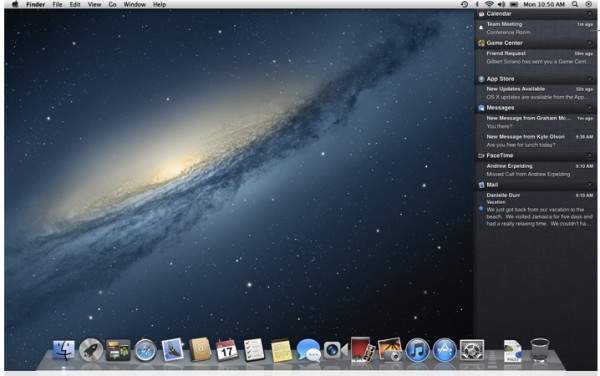
You can also use a new gesture to bring up Notification Center: a two finger swipe to the left from the right edge of the trackpad. Swiping right with two fingers from anywhere then closes the panel. It's Apple's first edge gesture, and it adds to OS X's already-intense mix of trackpad moves: two-finger swipes to scroll and navigate, three-finger swipes to manage spaces and full screen apps, and four-finger pinches to bring up Launchpad and show the desktop. In practice I found everything easy enough to remember — it's just another swipe to the left, after all — but a couple times I found myself accidentally going back in Safari when started my swipe in the middle of the trackpad instead of on the right side. Apple says the basic rule is that one finger gestures in iOS are two finger gestures in OS X, but I much preferred the unoffical Lion metaphor of two fingers for app-level commands and three and four fingers for system-level commands. Everything definitely works, but there's also definitely room for it to all work better in the final version.
(The addition of the Notification Center gesture also cements the need for a Magic Trackpad if you're a desktop Mac user — there's no key command to invoke the panel, and the Magic Mouse won't have a gesture for it either. You're stuck clicking on the icon unless you have a trackpad.)
There's a new preference pane to manage notifications and how they're displayed; as with everything else about Notification Center it'll look very familiar to iOS 5 users. Settings like notification type, icon badges, and sounds are managed on a per-app level, and you can order notifications manually or have them auto-sort by time. And… that's really it. Just as in iOS 5, the system works well, but isn't tremendously flexible — Growl users with wild custom configurations are going to bristle against Notification Center's limitations for quite some time. You can't even set notifications to display in a different corner of the screen — it's the upper right or nothing. Apple says the idea is that notifications should disappear to where users can find them again, but I'm hoping that goal is expressed as a default setting that can be changed in the final version, not the only setting.
On the other hand, if you're not using Growl you'll find Notification Center to be a major enhancement to the OS X experience — it's hard to imagine life without centralized notifications after using it for a while. We're just hoping Apple keeps with its recent hiring history and poaches a few people from the Growl team to make Notification Center even better as time goes on.

Messages

iChat's been given a new name, a huge makeover, and some major new functionality in Mountain Lion: it's now called Messages, features a very iPad-like single window interface, and supports Apple's proprietary iMessage service with hooks to launch FaceTime video calls. (FaceTime is still a separate app, but Messages can launch it and initiate a call without any additional steps.) You can actually try Messages out right now — Apple's offering a free beta for Lion users that'll expire when Mountain Lion comes out this summer.
Underneath the hood Messages is just an update to iChat — version 6.1, according to the about box — but apart from the preferences window and buddy list for Google Talk, Jabber, AIM, and Yahoo, you'd never know it. The new interface blends IM, text messaging, and message history search into something else entirely. It's especially great when you use iMessage, which seamlessly spans devices using iCloud: it's easy to start a conversation on the desktop, carry it over to an iPad, and then walk out the door still chatting on an iPhone without any interruption — and then come home and quickly search through your entire message history. When this all works, it definitely feels like the future.

There are still some rough edges in the developer preview, however. The first problem is simply structural: not everyone uses iMessage for everything, and it's easy to find yourself looking at an unwieldy mix of iMessage, Google Talk, and AIM messages all from the same person at the same time. People use different message services for different things, but Messages wants to mix everything together in a way that doesn't always make sense — and only iMessages will sync across devices, so you might find yourself missing pieces on iOS devices. iMessages sent from iPhones that fall back to SMS also won't show up, which can be confusing. It's also a little backwards that the interface requires an extra click to start a new message but search is always open; I want to write new messages far more often than I want to search old ones, after all.
But by far the biggest issue preventing Messages from being the ultimate unified messaging system is that iMessage on the iPhone is tied to your phone number by default, while the iPad and Mountain Lion use email addresses to identify your iMessage account. That means you can send iMessages from your computer to your heart's content, but messages sent to your phone number simply won't show up on your computer or iPad. Switching your iPhone to use your email address for caller ID solves the problem in a roundabout way — anyone replying to you will send iMessages to your email address, but new iMessages sent to your phone number will still only arrive on your phone.
Encouragingly, Apple seemed to understand the caller ID issues with Messages when I asked, so I'm hoping there's a cohesive solution in the works — there's certainly plenty of time before Mountain Lion ships this summer.

AirPlay Mirroring

AirPlay is one of the best features of iOS, and Apple's bringing some of it to OS X — you can now use AirPlay Mirroring with an Apple TV to view your computer's screen on a television. The AirPlay icon simply appears in the menu bar when you're on the same network as an Apple TV, and it's just one click to turn it on. You'll get stereo audio and output is limited by the Apple TV to 720p, but Mountain Lion will automatically switch to the best local screen resolution it can find for your system and scale automatically, so you don't really need to worry about settings. You're able to play iTunes movies and TV shows, but licensing restrictions unfortunately means the local display gets blacked out. (This is particularly stupid, but it's only fair to blame the studios for such foolishness, not Apple.)
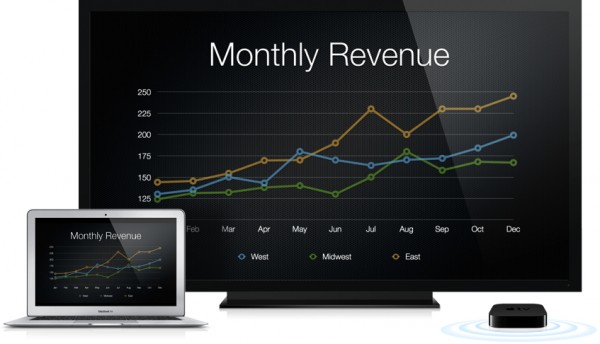
AirPlay wasn't yet enabled on our test system, but Apple showed us a very impressive demo of an iPad and a MacBook Air playing Real Racing head-to-head, with the Mac streaming to a TV. We'll have to see how it all works with real-world bandwidth in our own living room, but what we saw was definitely amazing — and we can think of many, many more possibilities for AirPlay on OS X beyond simple mirroring down the line.

Game Center

By the way, you read that right — we saw Real Racing on a Mac being played head-to-head with an iPad. Apple's bringing Game Center and Game Kit to OS X to capitalize on the enormous popularity of games in the Mac App Store, and yes, it's all cross-compatible with iOS. The Game Center app looks and feels just like the iOS Game Center app, with friends, finding multiplayer opponents, leaderboards, achievements, and now in-game voice chat on OS X. We weren't able to try it out on our preview system, but Apple demoed adding a friend for us, and it worked exactly as you'd expect, complete with notification and that super-annoying Game Center bugle audio alert. Thankfully, you can turn it off.

Game Kit lets developers quickly make use of all those features, as well as support cross-device multiplayer for both live and asynchronous games, and Apple says developers who've used the Game Kit APIs for iOS will find it pretty easy to make them work on OS X. We're not sure if the Mac will ever match up against PC gaming when it comes to raw framerates and horsepower, but Apple's certainly sweetening the OS X gaming experience in other ways — and tying the Mac into the huge popularity of iOS gaming certainly seems like a smart move.

iCloud

Mountain Lion is Apple's first OS X release after the launch of iCloud, and the cloud service is woven even more tightly into the system. You're presented with an Apple ID login screen when you first install the OS, and the system pulls down and sets up iCloud, Mac App Store, FaceTime, and iTunes automatically. You're then prompted to setup iCloud itself, and the system will auto-populate your contacts, calendars, and bookmarks for you.
Apple's also added Documents in the Cloud to 10.8, so apps can now store and access files directly from iCloud. It's not currently enabled in our developer preview build, but it worked seamlessly in the demo we saw — Pages documents created on the iPad instantly showed up in the new iCloud-enabled Document Library, and changes made on the Mac were instantly pushed to the iPad. You can also now make folders for iCloud documents using an interface that's much like the iOS app folders UI, but there's still no proper user-visible file system for iCloud, and if you want to share files among apps you'll have to download them to your machine first.
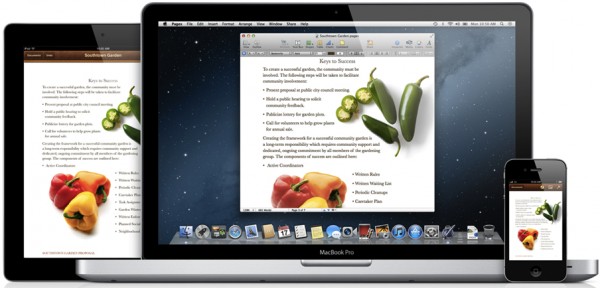
iCloud also does a lot of silent work in the background in Mountain Lion: apps like Messages, Reminders, Calendar, and Notes all seamlessly sync across devices, and Safari syncs tabs across OS X and iOS, much like the new Chrome for Android. Third party apps can of course tap into all these services as well, and a new API lets developers enable Documents in the Cloud and Document Library as well.

China

China is Apple's largest-growing market, and Mountain Lion offers improved Chinese text input with better prediction and autocorrection, the ability to include English characters without switching keyboards, and improved handwriting recognition for Chinese characters. There's also a number of new Chinese services integrated in Mountain Lion, including the Baidu search engine, the Sina weibo blogging service, the Youku and Tudou video services, and the QQ, 126, and 163 mail services.

Calendar

Calendar in Mountain Lion still sports the hideous faux-leather texture treatment it got in Lion, but two of the more glaring interface annoyances have been remedied: clicking the Calendars button now slides open a listing of all your calendars instead of dropping down a popover sheet and you can turn off invitation alerts while leaving meeting reminders active.

Notes


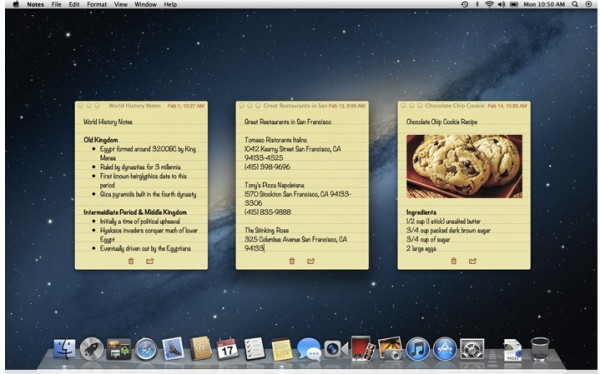
Notes is now a standalone application that looks almost exactly like the iPad Notes app, although thankfully with less faux-stitched-leather accents. (There's still a fake ripped-paper effect at the top of the notes field, and the window header still has a fake leather texture, though. Sigh.) You can double click on a note to pop it open in a standalone window that'll remain open even after you quit the main Notes app, and you can set individual note windows to always stay on top, although the windows disappeared in Mission Control and couldn't be moved on top of full screen apps or other Spaces. (We're hoping this changes in the final build.)
Notes also support inline images and links, and you can format fonts, styles, and colors any way you like. There's also a surprisingly robust bulleted-list feature that kicks in as soon as you type a bullet, which is nice. Notes syncs with iCloud out of the box, but you can also sync with Gmail, Yahoo, and other services that support notes.

Reminders


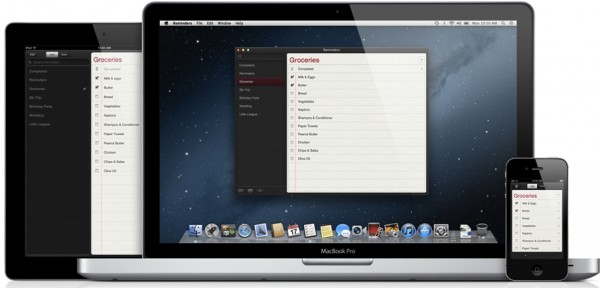
Reminders were built into iCal in Lion, but Apple's pulled the feature out and built a dedicated Reminders app in Mountain Lion that — surprise! — looks just like the iOS 5 Reminders app. Reminders can be added to iCloud and automatically synced across devices, but you can also sync with CalDAV services like Google Calendar and Yahoo. Mountain Lion doesn't offer any fancy location-aware reminders like iOS 5, but there's all the other basic functionality you'd expect: alerts, due dates, priorities, multiple accounts and lists. Other than that, it's a pretty bare-bones app — it doesn't even have preferences dialog.

Sharing / Twitter

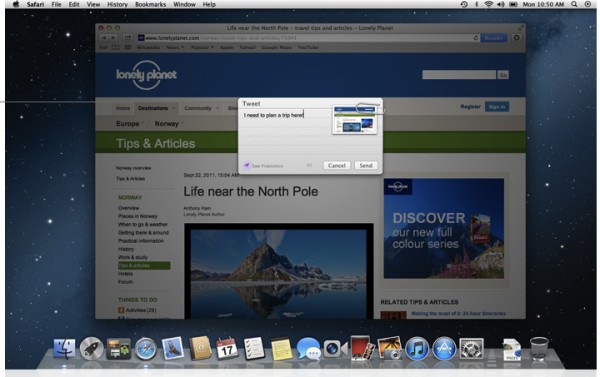
iOS-style share buttons have popped up all over Mountain Lion, offering you the ability to quickly share almost anything via Mail, Messages, AirDrop, Flickr, Vimeo, and Twitter. Twitter is a standout: just like iOS, it's integrated throughout the system, and you'll get notifications for replies and direct messages. You can also sync contact pictures with your Twitter list, and tweets can pick up your rough location using OS X's Location Services.

Once you pick a service in the share drop down, an iOS-style share sheet appears and lets you post directly from whatever app you're in — and you can share anything you can Quick Look from anywhere in the system as well. There's an API that lets developers add share buttons to third party apps, but there's no way to add additional services — a pity, since Facebook and YouTube are notable omissions. (Facebook and YouTube do appear in QuickTime Player's share list and it sounds as though they may come to iPhoto, but they're not system-wide.)
Gatekeeper is a major new addition to Mountain Lion, and a major change for OS X app distribution in general. Apple will now be offering Mac developers the ability to sign their apps before distribution, and Mountain Lion will ship out of the box restricted to running only signed apps and apps from the Mac App Store. (You can still run any app you want by right-clicking on an unsigned app or simply changing the global setting to allow apps from anywhere. You can also lock things down even tighter and only allow App Store apps to run.) Apple's says it's still tweaking a lot of the language and controls around Gatekeeper, so expect the text in the screenshot above to be different when Mountain Lion ships — the company wants to make Gatekeeper easy to understand and use without training users to blindly accept defaults.
Apple says Gatekeeper is a response to the growing threat of malware that relies on clever social engineering to get users to run malicious code hidden within another seemingly-innocuous app — the company doesn't think it's a huge problem now, but it's trying to ward it off at the pass. There's some basic identity verification when developers sign up for a certificate, but the overall process is meant to be quick and easy; Apple is insistent that the goal of Gatekeeper is not to curate or control the broader world of Mac app development, but rather to make getting apps from the web safer for end users. To that end, there's no cost to developers beyond the standard Mac developer program fees, and the key is valid even if the developer quits the program.
It's also important to note that the system is essentially local: your machine will download a list of keys from Apple at least daily, and Apple doesn't track what apps you're running or anything like that. (Your Gatekeeper setting gets sent if you opt-in to diagnostic reports, however.) On paper, it sounds like a clever solution to the malware problem, but Apple's going to have to convince developers to participate for it to work — expect to hear a lot about Gatekeeper in the months to come.
There's a ton of new stuff in Mountain Lion — we've just scratched the surface of the developer preview, and we haven't even talked about the new unified search / address bar in Safari, the VIP filter in Mail, or the complete disappearance of Software Update in favor of App Store updates. And that's just the beginning: Apple says that plenty will be changed and added between now and the final release this summer.
But even with all the rough edges and loose ends in the developer preview, Mountain Lion looks like a must-have update to OS X — the combination of Notification Center, AirPlay, and Messages more than makes up for any of Lion's lingering irritations, and I say that as someone who's stubbornly remained on Snow Leopard for the past seven months. Apple's not saying how much 10.8 will cost when it arrives, but just like Lion, it'll be distributed exclusively in the Mac App Store. Until then, we'll be tracking Mountain Lion's development closely — and trying to dig up as much as we can onnext year's release of OS X.

References

  1. ^ Mac OS 10.7 Lion (www.theverge.com) ( http://www.theverge.com/2011/10/24/2510590/mac-os-x-lion-review )
  2. It's only been seven months since Apple launched Mac OS 10.7 Lion 1 , but the company isn't sitting still: it just announced the developer preview of OS X 10.8 Mountain Lion, a tweaked and enhanced new version of the operating system that includes major new features like Notification Center, AirPlay mirroring, and iMessage. Yes, those are all headline iOS features as well; Mountain Lion continues Apple's cycle of using the iPhone and iPad to influence Mac development and vice versa.

Cooking Oil Comparison Chart