Showing posts with label civil liberties. Show all posts

Tuesday, April 03, 2012

Facebook & Work: What you need to know

Friday, March 09, 2012

Web Security: HTTPS Available from EFF (Chrome and Firefox)


HTTPS Everywhere Keeps Your Personal Information Safe on Over 1,400 Sites, Available for Firefox and Chrome
Chrome/Firefox: HTTPS Everywhere is a simple extension that, with just a one-click installation, can seriously increase your security on over 1,400 web sites by encrypting your connection.
We've talked before about HTTPS, what it does, and why you should use it . Many sites, like Gmail (and Facebook, with caveats ) have options that let you browse with HTTPS always turned on, but the HTTPS Everywhere extension makes this simpler. Instead of turning it on for individual sites, HTTPS Everywhere will automatically routes all your data through a secure connection on any of its 1,400 supported web sites, keeping your information safe and away from prying eyes—in short, it's an extension everyone should have installed.
HTTPS Everywhere has long been a favorite of Firefox users , but today marks the first time Chrome users can get in on the fun, with a new beta version of the extension that quietly sits in your address bar and switches you to HTTPS whenever possible. The Firefox version has also been updated to 2.0, which adds a new feature called the Observatory which, when turned on, detects encryption weaknesses and will notify you when you're browsing a site with a security vulnerability. To read more about the new version of the extension and install it in your browser, hit the link below.
HTTPS Everywhere is a free extension, works wherever Chrome and Firefox do.
New 'HTTPS Everywhere' Version Warns Users About Web Security Holes | Electronic Frontier Foundation

Sex Ed Curriculum for Conservatives


Recent national kerfuffles over abortion and contraception access bring up many important questions: Should employers retain control over your wages and benefits after they sign them over to you? Is contraception, a service used by 99 percent of American women, really so controversial? How much state regulation should there be over women's most private decisions? But amidst all those questions is one overarching one: Do conservatives need a crash course in sex ed?

image

Radio show host Rush Limbaugh speaks at a forum hosted by the Heritage Foundation on the similarities between the war on terrorism and the television show 24, in Washington, June 23, 2006. (REUTERS/Micah Walter)

Usually, when we think of the sex education debate, we think of junior high and high school kids putting condoms on bananas. But recent events indicate that this country needs remedial sex education for adults, specifically social conservatives who wish to hold forth on reproductive rights without seeming to know the basics regarding who has sex and how it works in 2012. With that in mind, I designed a quick curriculum for these surprisingly necessary courses.
Intercourse 101: It Takes Two to Tango. After voting for a mandatory ultrasound bill that serves no other purpose than to shame abortion patients for their sexuality, Virginia delegate David Albo complained in the legislature that he's not getting the sex he feels entitled to from his wife. CNSNews columnist Craig Bannistershamed women on the pill for being "sex-crazed co-eds" who exhibit too much "sexual zeal" — before ending his piece by wistfully wishing he could have sex with all the sexually active women he just insulted. Rush Limbaugh, who is on his fourth marriage and is an admitted Viagra user , called Sandra Fluke , a Georgetown University law student who testified before Congress about her use of contraception, a "slut" and a "prostitute."
In this first section of the remedial sex education course, we will discuss this sexual double standard: When having sex, men are behaving well and women behaving badly. The midterm will be an essay on the following prompt: "If women are supposed to say no to sex, whom do you propose straight men sleep with?"
Contraception 101: History as Prologue. Many conservatives appear to believe that prior to the Obama administration requiring employers to fully cover contraceptive care as part of their health plans, contraception wasn't considered a medical service, but something more like a party item you pick up with your beer and cigarettes. Tina Korbe of Hot Air argued that supporters of the new regulation "labor under the illusion that contraception is a medical necessity." Limbaugh argued that health insurance covering contraception means women are "paid to have sex." The reaction on the right suggests that this is the first time in history someone has suggested that contraception care be included in general health benefits.
During this portion of the class, we will look at the history of medicalized birth control. Students will learn (in conjunction with another mandatory class, The Pill 101) that the birth control pill has always been controlled by doctors and pharmacies, and that insurance companies treat it as medical care by offering the drug with a co-pay. Special attention will be paid to the 28 states that already require contraception coverage, the existing Medicaid coverage of contraception, and the Equal Employment Opportunity Commission decision that found that contraception coverage is a normal part of women's healthcare that should be covered by healthcare plans.
Premarital Sex 101: A Quantitative Look. Underlying many of the arguments over women's reproductive healthcare is a widespread fear of women using these rights to have sex outside of marriage. During the Arizona Republican primary debate, Rick Santorum blamed contraception for the problem of teen pregnancy, presuming that teenagers in a contraception-free world would instead abstain. Utah Republicanstate representative Bill Wright defended a bill banning discussion of contraception in schools by saying: "Why don't we just be honest with them upfront that sex outside marriage is devastating?"
Contrary to students' expectations, there is no high-level math prerequisite for this course. The statistics involved are relatively straightforward. Students will learn that 95 percent of Americans have premarital sex and have done so for decades without bringing ruin to the nation. In addition, students will read literature showing that the teen pregnancy rate actually declined after the sexual revolution, leaving it at half the rate it was in the 1950s. Students will be asked to research why it is that blue states, where residents are more likely to use contraception and delay marriage, have lower rates of divorce and teen pregnancy .
The Pill 101: A Scientific Look. The ignorance on display on the right regarding the birth control pill, which has been around as a contraceptive for over 50 years, has been astounding. Limbaugh's comment — "she's having so much sex she can't afford her own birth control pills" — indicates that he believes there's a correlation between the number of sexual encounters and the number of pills necessary. Limbaugh also seems to think mothers and women who use birth control are mutually exclusive categories, saying: "How do you become a mom if you're into birth control?" Additionally, with words such as "slut," "prostitute" and "sex-crazed" flying around to describe women on hormonal contraception, it appears many conservatives believe that the drugs exist primarily for use by single women with multiple partners.
Students in our remedial sex ed course will take their time learning about hormonal contraception. They will learn that women on the pill must take one every day for it to work, no matter how much sex they're having. Students will discover that monogamy isn't enough to prevent unintended pregnancy, and thus married and monogamous women use the pill just as single women do. To drive home what not using contraception would mean for women, married and otherwise, students will be asked to watch the TLC show about the Duggar family , with its 19 children, and then offer a five-minute presentation in class.
As evidenced by the ignorant rot tumbling out of various right-wing mouths in response to these controversies, a curriculum of this kind is sorely needed. Perhaps female Democrats in Congress can write a bill funding Sex Education for Grown-Up Pundits and help elevate the conversation with a little basic understanding.

Thursday, February 23, 2012

Tips and Tricks: Protect Your Online Privacy with These Tips


It's no secret that there's big money to be made in violating your privacy. Companies will pay big bucks to learn more about you, and service providers on the web are eager to get their hands on as much information about you as possible.
So what do you do? How do you keep your information out of everyone else's hands? Here's a guide to surfing the web while keeping your privacy intact.
The adage goes, "If you're not paying for a service, you're the product, not the customer," and it's never been more true. Every day more news breaks about a new company that uploads your address book to their servers , skirts in-browser privacy protection , and tracks your every move on the web to learn as much about your browsing habits and activities as possible. In this post, we'll explain why you should care, and help you lock down your surfing so you can browse in peace.

Why You Should Care

Your personal information is valuable. More valuable than you might think. When we originally published our guide to stop Facebook from tracking you around the web , some people cried "So what if they track me? I'm not that important/I have nothing to hide/they just want to target ads to me and I'd rather have targeted ads over useless ones!" To help explain why this is short-sighted and a bit naive, let me share a personal story.
Before I joined the Lifehacker team, I worked at a company that traded in information. Our clients were huge companies and one of the services we offered was to collect information about people, their demographics, income, and habits, and then roll it up so they could get a complete picture about who you are and how to convince you to buy their products. In some cases, we designed web sites and campaigns to convince you to provide even more information in exchange for a coupon, discount, or the simple promise of other of those. It works very, very well.
The real money is in taking your data and shacking up with third parties to help themcome up with new ways to convince you to spend money, sign up for services, and give up more information. Relevant ads are nice, but the real value in your data exists where you won't see it until you're too tempted by the offer to know where it came from, whether it's a coupon in your mailbox or a new daily deal site with incredible bargains tailored to your desires. It all sounds good until you realize the only thing you have to trade for such "exciting" bargains is everything personal about you: your age, income, family's ages and income, medical history, dietary habits, favorite web sites, your birthday…the list goes on. It would be fine if you decided to give up this information for a tangible benefit, but you may never see a benefit aside from an ad, and no one's including you in the decision. Here's how to take back that control.

Click for instructions for your browser of choice:


How to Stop Trackers from Following Where You're Browsing with Chrome

If you're a Chrome user, there are tons of great add-ons and tools designed to help you uncover which sites transmit data to third parties without your knowledge, which third parties are talking about you, and which third parties are tracking your activity across sites. This list isn't targeted to a specific social network or company—instead, these extensions can help you with multiple offenders.
  • Adblock Plus - We've discussed AdBlock plus several times, but there's never been a better time to install it than now. For extra protection, one-click installs the Antisocial subscription for AdBlock. With it, you can banish social networks like Facebook, Twitter, and Google+ from transmitting data about you after you leave those sites, even if the page you visit has a social plugin on it.
  • Ghostery - Ghostery does an excellent job at blocking the invisible tracking cookies and plug-ins on many web sites, showing it all to you, and then giving you the choice whether you want to block them one-by-one, or all together so you'll never worry about them again. The best part about Ghostery is that it's not just limited to social networks, but will also catch and show you ad-networks and web publishers as well.
  • ScriptNo for Chrome - ScriptNo is much like Ghostery in that any scripts running on any site you visit will sound its alarms. The difference is that while Ghostery is a bit more exclusive about the types of information it alerts you to, ScriptNo will sound the alarm at just about everything, which will break a ton of websites. You'll visit the site, half of it won't load or work, and you'll have to selectively enable scripts until it's usable. Still, its intuitive interface will help you choose which scripts on a page you'd like to allow and which you'd like to block without sacrificing the actual content on the page you'd like to read.
  • Do Not Track Plus - The "Do Not Track" feature that most browsers have is useful, but if you want to beef them up, the previously mentioned Do Not Track Plus extension puts a stop to third-party data exchanges, like when you visit a site like ours that has Facebook and Google+ buttons on it. By default, your browser will tell the network that you're on a site with those buttons—with the extension installed, no information is sent until you choose to click one. Think of it as opt-in social sharing, instead of all-in.
Ghostery, AdBlock Plus, and Do Not Track are the ones you'll need the most. ScriptNo is a bit more advanced, and may take some getting used to. In addition to installing extensions, make sure you practice basic browser maintenance that keeps your browser running smoothly and protects your privacy at the same time. Head into Chrome's Advanced Content Settings, and make sure you have third-party cookies blocked and all cookies set to clear after browsing sessions. Log out of social networks and web services when you're finished using them instead of just leaving them perpetually logged in, and use Chrome's "Incognito Mode" whenever you're concerned about privacy.

How to Stop Trackers from Following Where You're Browsing with Firefox

Many of the essential privacy extensions for Firefox are from the same developers who made their Chrome counterparts, and they work in similar fashion.
  • Adblock Plus - AdBlock Plus is just as essential in Firefox as it is in Chrome, as is the Antisocial subscription, which you can install at the Antisocial site. The extension and the subscription together are a powerful combination to remove annoying ads from sites you love, retain the ones that don't bother you, and keep ads and plug-ins from sending data about you without your explicit consent.
  • Ghostery - Ghostery is also available for Firefox, and gives you the same information about the scripts, cookies, and trackers under every site you visit. Click the icon in your status bar to see what information a given site is collecting and sending about you, and you can pick and choose what to allow or what to block.
  • Do Not Track Plus - Do Not Track Plus is also available for Firefox, and works the same way as the Chrome version.
  • NoScript - NoScript is a great extension and provides you an incredible amount of information about what's happening behind the scenes on any site that you visit—the trouble with it is that that information can be overwhelming, and if you don't allow certain things, the site simply won't work until you do. I have a bit of a love/hate relationship with NoScript for that reason, but if you're serious about not letting anything run on a site without your permission, this is the tool for you.
  • Priv3 - Although it's only available for Firefox, this experimental extension from researchers at Rutgers University and the International Computer Science Institute (ICSI) will protect you from third-party cookies set by Facebook, Twitter, Google+, and LinkedIn. We've mentioned it before , and I still have it installed myself. Like Do Not Track Plus, it doesn't remove elements from a page—it simply makes them inactive until you interact with them.
We'd say Ghostery, AdBlock Plus, and Priv3 are the essentials here. Do Not Track Plus and Priv3 cover some of the same territory, so you can go either way there, and as with Chrome, NoScript is for advanced users looking for more granular control. Firefox's "Do Not Track" feature is worth enabling as well, even if many sites circumvent it with well-placed cookies and social plug-ins that are all but required if a site wants a social media presence or solid placement in search results these days. Additionally, make yourself familiar with Firefox's privacy and content settings. As with any browser, we suggest you log out of services when you're finished, and set Firefox to clear your private data, cookies, and browsing history when you close the browser. If you're more worried about some sites than others, you can always just clear thosecookies when you log out.

How to Stop Trackers from Following Where You're Browsing with Internet Explorer, Safari, and Opera

Firefox and Chrome may get the spotlight in the browser wars, but those of you using Safari, IE, or Opera aren't totally safe just by virtue of your browser choice. Just this week, Google was caught with its hands in the cookie jar (no pun intended) circumventing cookie protection controls in Internet Explorer 9. Nik Cubrilovic has an excellent writeup of the situation , and he points out that they're not alone by any means. In response, Microsoft has published a tracking protection add-in for IE9 to stop them.
Regardless of your browser, the same types of basic maintenance we mentioned are in order. Do Not Track Plus is available for Safari and IE users, there's a special build of AdBlock for Safari . for Opera , and even Internet Explorer . NoScript or ScriptNo fans can use NotScripts for Opera to get the same effect. These are a few examples, but look around—its likely that while some of the extensions mentioned above may not be available for your preferred browser, someone's taken the initiative to write a similar add-on that gets the job done.

Mobile Browsing

Mobile browsing is a new frontier. There are dozens of mobile browsers, and even though most people use the one included on their device, there are few tools to protect your privacy by comparison to the desktop. Check to see if your preferred browser has a "privacy mode" that you can use while browsing, or when you're logged in to social networks and other web services. Try to keep your social network use inside the apps developed for it, and—as always—make sure to clear your private data regularly.
Some mobile browsers have private modes and the ability to automatically clear your private data built in, like Firefox for Android , Atomic Web Browser , and Dolphin Browser for both iOS and Android. Considering Dolphin is our pick for the best Android browser and Atomic is our favorite for iOS , they're worth downloading.

Extreme Measures

If none of these extensions make you feel any better, or you want to take protecting your privacy and personal data to the next level, it's time to break out the big guns. One tip that came up during our last discussion about Facebook was to use a completely separate web browser just for logged-in social networks and web services, and another browser for potentially sensitive browsing, like your internet shopping, banking, and other personal activities. If you have some time to put into it, check outour guide to browsing without leaving a trace , which was written for Firefox, but can easily be adapted to any browser you use.
If you're really tired of companies tracking you and trading in your personal information, you always have the option to just provide false information. The same way you might give a fake phone number or address to a supermarket card sign-up sheet, you can scrub or change personal details about yourself from your social network profiles, Google accounts, Windows Live account, and others.
Change your birthdate, or your first name. Set your phone number a digit off, or omit your apartment number when asked for your street address. We've talked about how to disappear before , and carefully examine the privacy and account settings for the web services you use. Keep in mind that some of this goes against the terms of service for those companies and services—they have a vested interest in knowing the real you, after all, so tread carefully and tread lightly if you want to go the "make yourself anonymous" route. Worst case, start closing accounts with offending services, and migrate to other, more privacy-friendly options.
These are just a few tips that won't significantly change your browsing experience, but can go a long way toward protecting your privacy. This issue isn't going anywhere, and as your personal information becomes more valuable and there are more ways to keep it away from prying eyes, you'll see more news of companies finding ways to eke out every bit of data from you and the sites you use. Some of these methods are more intrusive than others, and some of them may turn you off entirely, but the important thing is that they all give you control over how you experience the web. When you embrace your privacy, you become engaged with the services you use. With a little effort and the right tools, you can make the web more opt-in than it is opt-out.

Microsoft, Google and Netflix want to add DRM-hooks to W3C HTML5 standard


Microsoft, Google and Netflix want to add DRM-hooks to W3C HTML5 standard


A proposed anti-copying extension for the WC3's standard for HTML5 has been submitted by representatives of Google, Microsoft and Netflix. The authors take pains to note that this isn't "DRM" — because it doesn't attempt to hide keys and other secrets from the user — but in a mailing list post, they later admitted that this could be "addressed" by running the browser inside a proprietary hardware system that hideverything from the user.

Other WC3 members — including another prominent Googler, Ian Hickson — have called for the withdrawal of the proposal. Hickson called it "unethical." I agree, and would add "disingenuous," too, since the proposal disclaims DRM while clearly being intended to form a critical part of a DRM system.
In an era where browsers are increasingly the system of choice for compromising users' security and privacy, it is nothing short of madness to contemplate adding extensions to HTML standards that contemplate designing devices and software to deliberately hide their workings from users, and to prevent users from seeing what they're doing and changing that behavior if it isn't in their interests.
Writing on Ars Technica, Ryan Paul gives a good blow-by-blow look at the way that this extension is being treated in the W3C:
Mozilla's Robert O'Callahan warned that the pressure to provide DRM in browsers might lead to a situation where major browser vendors and content providers attempt to push forward a suboptimal solution without considering the implications for other major stakeholders.
Some of the discussion surrounding the Encrypted Media proposal seem to validate his concerns. Mozilla's Chris Pearce commented on the issue in a message on the W3C HTML mailing list and asked for additional details to shed light on whether the intended content protection scheme could be supported in an open source application.
"Can you highlight how robust content protection can be implemented in an open source webrowser?" he asked. "How do you guard against an open source web browser simply being patched to write the frames/samples to disk to enable (presumably illegal) redistribution of the protected content?"
Netflix's Mark Watson responded to the message and acknowledged that strong copy protection can't be implemented in an open source Web browser. He deflected the issue by saying that copy protection mechanisms can be implemented in hardware, and that such hardware can be used by open source browsers.
"Unethical" HTML video copy protection proposal draws criticism from W3C reps(Thanks, Rob! )

DataLocker, File Encryption For Windows, Mac, iOS


With cloud hosting taking over much of what we are hosting locally right now in the next ten years or so, it becomes important to protect your remotely saved data from unauthorized access. Some cloud hosting providers encrypt the data automatically, but that is still no guarantee that your data is safe. The algorithm used might be flawed, or the company might retain the right to decrypt your data at any time. This can for instance happen when authorities ask them to do that.


The only solution to this problem is to encrypt your data on your own before you shove it into the cloud. We reviewed BoxCryptor before which added an encrypted layer around your data before it was transferred to Dropbox.
DataLocker provides a similar service. The program is available for Windows and Mac operating system, as well as mobile systems running Apple's iOS system (iPad and iPhone currently only).
You need to request the software on the developer site by filling out a form there. The download link will be in the email that you receive after filling out the form.
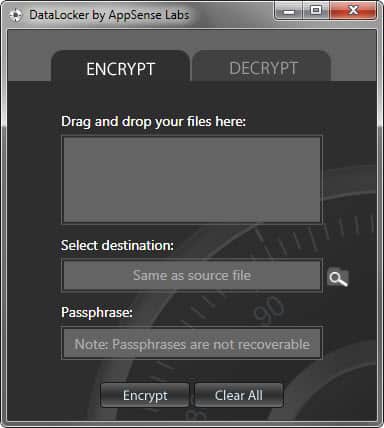
When you install the program you see a basic interface where all of the encrypting and decrypting takes place.
The program will save the encrypted files by default in the same directory the source file is stored in. This is great if you want to secure your local files. If you want to move them to the cloud, you need to manually move them into the right directory or copy them over. Doing that is not overly comfortable though, especially since you can only encrypt files and not folders and all of the files stored inside.
To encrypt files, drag and drop them into the program interface, select a password and change the destination directory if you want. Encrypted files are saved with an ALK extension on the system.
Decrypting works in the same way, only that you need to drag and drop the encrypted files into the program interface instead.
DataLocker is a simple program. It could use a few settings that would make it more usable, like the ability to encrypt folders or better automation to move encrypted files directly into the Dropbox folder.
The Windows version of the program supports both 32-bit and 64-bit editions of the operating system. It requires the Microsoft .NET Framework 4.0 to be installed on the system. (via Caschy )
Enjoyed the article? : Then sign-up for our free newsletter or RSS feed to kick off your day with the latest technology news and tips, or share the article with your friends and contacts on Facebook or Twitter.


Five Best File Encryption Tools

File encryption is your best bet if you want to keep The Man, foreign spies, or your annoying roommates out of your files. Here's a look at five of the most popular encryption tools Lifehacker readers use to lock down their files.

GNU Privacy Guard (Windows/Mac/Linux, Free)

Five Best File Encryption Tools
GNU Privacy Guard (GnuPG) is an open-source implementation of the famed Pretty Good Privacy (PGP) encryption tool—you can read the very interesting history of PGPand how GnuPG came to be here. GnuPG is a volume and individual file encryption tool with support for a dozen encryption schemes, paired keys, and expiring signatures. GnuPG doesn't only provide rock-solid local file encryption; it is, thanks to paired encryption and public key servers, a great tool for encrypted communication. Please note, regular old GnuPG is a command line tool. Check out the list of graphical wrappers and application plug-ins for various operating systems here. The screenshot above is from Cryptophane, a graphical Windows interface for GnuPG.

Disk Utility (Mac, Free)

Five Best File Encryption Tools
Disk Utility is a diverse tool that handles almost any disk-related tasks you'd need on OS X. The utility is capable of creating secure disk images and file volumes encrypted with AES 128-bit or 256-bit encryption. Like most native Mac utilities and applications, Disk Utility and the accompanying encryption blends seamlessly into the OS X experience and makes mounting and unmounting encrypted volumes a breeze. If you've never created an encrypted disk using Disk Utility before, take a look at our previous guide.

TrueCrypt (Windows/Mac/Linux, Free)

Five Best File Encryption Tools
TrueCrypt is a free, powerful, and on-the-fly disk encryption tool. With TrueCrypt, you can create secure encrypted virtual disks or even encrypt entire drives. TrueCrypt is an on-the-fly encryption tool, meaning files are decrypted as you access them and modify them and then encrypted when not in use. Thanks to various optimization tricks and full utilization of the power of modern processors, working within a TrueCrypt volume feels no different than working on a regular unsecured disk. TrueCrypt not only offers strong and transparent encryption—it also offers the ability to create hidden volumes within encrypted volumes for even more secure (and obscured) file protection.

7-zip (Windows, Free)

Five Best File Encryption Tools
Compared to some of the heavyweights in this Hive Five (like GnuPG and TrueCrypt), it might be easy to dismiss the popular file compression tool 7-zip as a lightweight. 7-zip fills a perfect niche for many people, however, by offering simple ZIP container-based encryption. If you're not interested in encrypting a ton of files or maintaining an entire encrypted volume, but you still want to make sure important documents like tax returns or other Social Security bearing documents are locked up tight, 7-zip sports strong AES-256 encryption. Create a new compressed archive, throw your files in it, and slap a password on. Your files are strongly encrypted and stored right alongside your regular documents.

AxCrypt (Windows, Free)

Five Best File Encryption Tools
AxCrypt is a free encryption tool for Windows. Once installed it integrates with the Windows shell and offers simple right-click encryption and decryption of files with AES-256 encryption. Your entire interaction with AxCrypt can take place exclusively from the right-click context menu. In addition to integrating with Windows and offering easy encryption and decryption, you can also use the tool to create self-extracting archives to securely transport files or transfer them to a friend—no AxCrypt installation necessary at the other end.

Related Articles:
Blowfish Advanced File Encryption and Security Tool
Avoiding EFS Encryption Disasters in Windows
Text Encryption Made Easy With Scrambled Egg
Encrypt Instant Messaging with Pidgin Encryption
BoxCryptor, Dropbox Realtime Encryption